

How Batch Works
Break down large jobs into manageable pieces and process them through queues.- Create batch with unique batchId containing work items
- Assign workflow to process each item
- Items placed in queue for parallel processing
- Track completion and trigger actions when batch finishes
Batch Features
- Unique Identification: Each batch gets a unique batchId
- Flexible Item Structure: Define custom data for each item
- Completion Actions: Configure triggers, webhooks, or no action when batch completes
- Real-time Monitoring: Track batch progress and individual item status
Large CSV uploads
Batches can also be created from a CSV file. Three ingest paths are supported, depending on the size of the file:Browser-direct CSV upload flow
To use thecsvKey path:
-
Request a presigned upload URL. The request body declares the filename and exact byte size of the file you’re about to upload; the platform validates against the 1 GiB cap and pre-signs an S3 PUT URL bound to that exact
Content-Length.POST /api/queues/{queueId}/items/csv/upload-urlResponse:ThecsvKeyis server-controlled (the platform generates the UUID; the customer never supplies any part of it). The presigned URL expires in 5 minutes. -
Upload the file directly to S3 with an HTTP
PUTtouploadUrl. The presigned URL is bound to the exactsizeBytesyou declared and toContent-Type: text/csv, so the request must set both headers:Mismatched headers cause an S3 signature failure. The browser’sXMLHttpRequest.upload.onprogressevent can drive an upload progress bar; no traffic flows through the API. -
Create the batch by posting to the existing CSV-ingest endpoint with the returned
csvKeyand the workflow trigger to run for each row:POST /api/queues/{queueId}/items/csvtriggerIdis required — it identifies the workflow trigger the batch’s per-row Runs will fire. Additional optional fields includename(display label),onDoneTriggerId(run a follow-up trigger when the batch completes), andonDoneWebhookUrl(POST to a URL on completion). The platform’s batch-processor then validates the CSV header, chunks the file into ~1,000-row segments, and creates one workflow Run per row on the customer’s queue.
What happens during ingest
A CSV-driven batch moves through three statuses on its way torunning:
validating— the batch-processor reads just the head of the CSV and confirms the column shape. Fast (sub-second on typical files).pending— the chunker streams the full file to count rows, enforces the 500,000-row cap, and publishes per-chunk row-creation jobs to an internal SQS queue. A very large CSV can sit in this state while counting. A batch that exceeds the row cap is canceled here with reasonrow_count_exceeded.running— chunks are being processed in parallel; the customer’s queue starts dispatching Runs as soon as each chunk’s rows land.
Per-row errors
Rows that fail validation are recorded as individualBatchRowError records rather than failing the entire batch. The two failure modes shipped in v1 are:
column_count— the row has more or fewer columns than the CSV headerunterminated_quote— the CSV parser hit an unterminated quoted-field run while reading this row
GET /api/queues/{queueId}/batches/{batchId}/row-errors?limit=&cursor=
The response paginates with an opaque cursor; pass it back as the next call’s cursor parameter to walk through all errors. Counts of valid runs created and rows skipped are also surfaced on the Batch record itself (runsRequested, runsSkipped).
Queue Integration
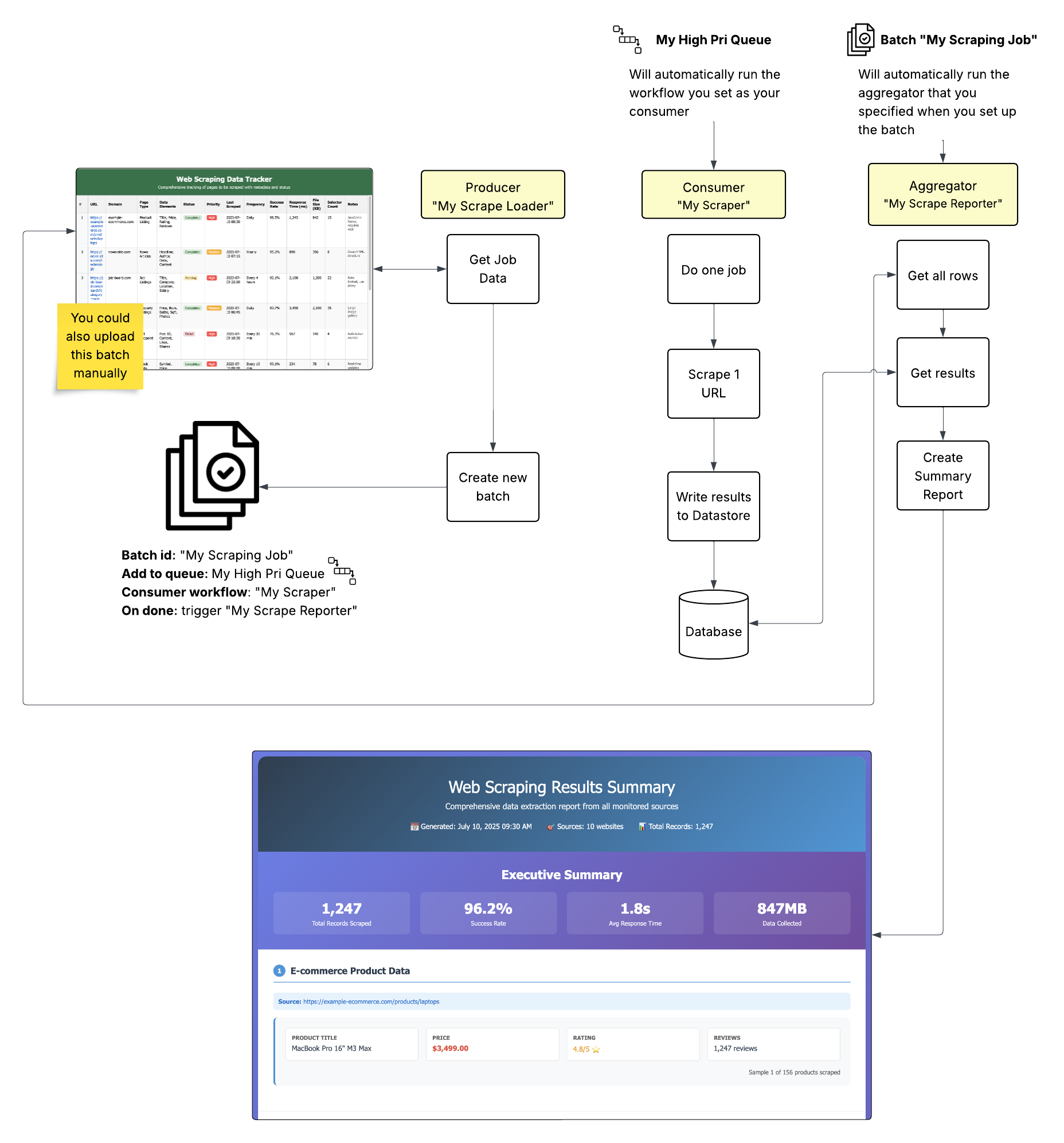
Batch service integrates with Queue service:- Batch items are placed into queues for processing
- Queue workers process individual items
- Queue tracking monitors batch completion
- Completion triggers fire when batches finish
Example: Producer-consumer pattern showing how batches break down big jobs into manageable queue items for parallel processing.
Questions? Reach out on Discord https://discord.com/invite/HaDg7R4VZG