

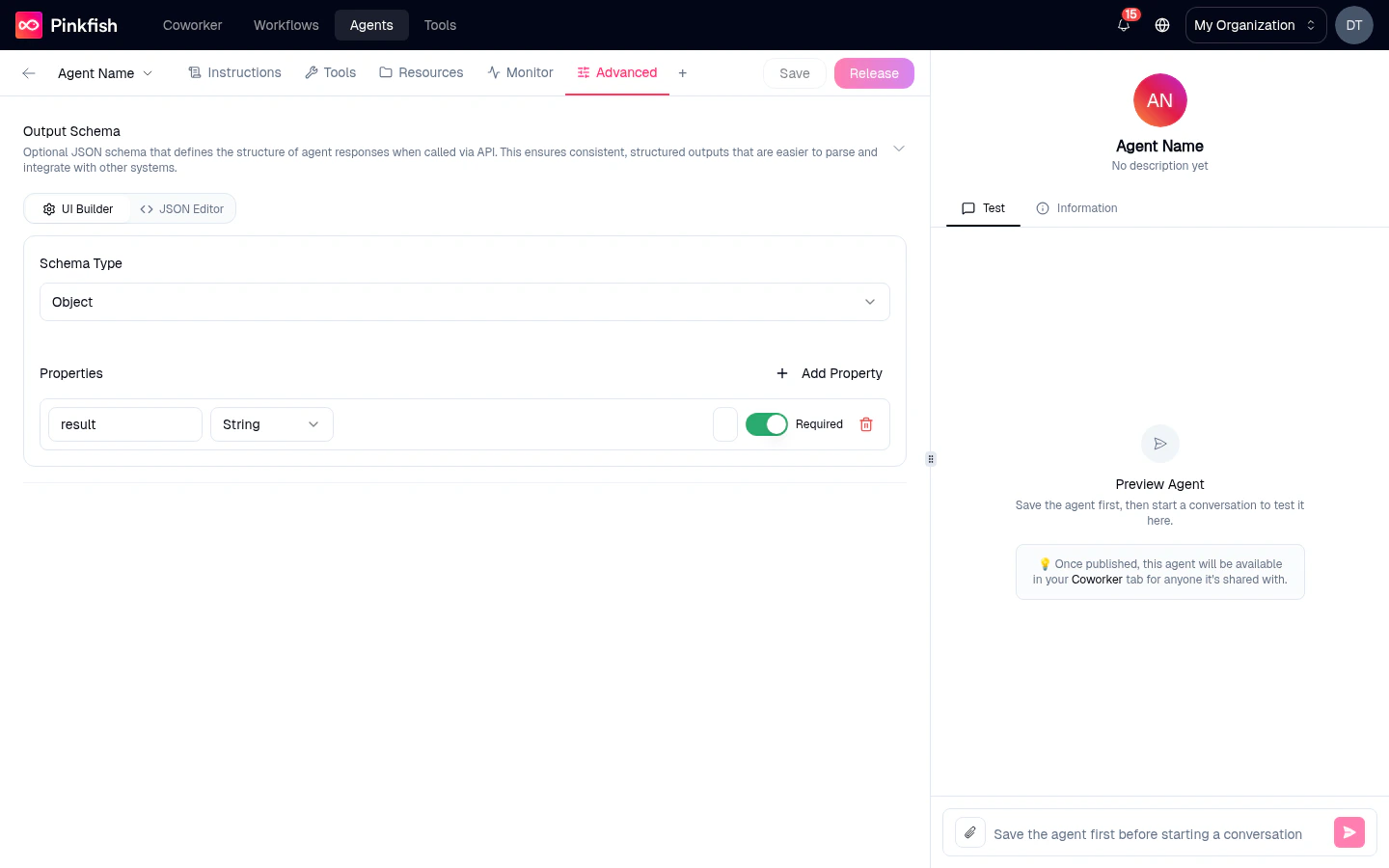
Output Schema
“Optional JSON schema that defines the structure of agent responses when called via API. This ensures consistent, structured outputs that are easier to parse and integrate with other systems.”When set, every API response from this agent conforms to the schema you defined. No more hand-rolling regexes against free-text replies — the agent returns a validated JSON object you can hand straight to your downstream code.
Who this is for
Output Schema matters almost exclusively for programmatic callers of the Agent Management API. If you only ever chat with the agent in Coworker, Slack, or Teams, leave it blank — those surfaces display the free-form reply the model produced.How to configure
The editor has two modes — switch via the Builder / JSON Editor toggle at the top.Builder mode
A visual builder:- Schema Type — pick the top-level shape. Usually
Object, but primitives are supported too. - Properties — a table of fields, each with a name, a type (
String,Number,Boolean,Object,Array, etc.), and a Required toggle (shown as a green switch when on). - Add Property — append a new row. For complex shapes, drill into a property to set nested properties, descriptions, and enum values.
JSON Editor mode
Paste or hand-write a standard JSON Schema. Handy when you already have a schema defined elsewhere and want to copy it over.What it does at runtime
- API callers — responses are returned as JSON matching the schema. The agent retries internally if the model’s first attempt is malformed.
- Coworker / Slack / Teams — the platform extracts the message field from the response and renders it as normal prose. The schema is still enforced on the underlying object, but users see a regular chat reply.
When not to set an output schema
- You want the agent to reply conversationally —
Output Schematrades naturalness for predictability. - Your responses need to be long-form essays or creative writing. Narrow the schema only to fields you genuinely need downstream.
- You’re still iterating on behavior. Nail the agent’s content first, then add a schema once the shape is stable.
What’s not on the Advanced tab
Things people sometimes look for here but won’t find:- Model selection — lives on Instructions.
- Temperature, max tokens, reasoning effort — controlled via the model choice on Instructions (e.g.
Opus Low / Med / Highas discrete thinking-effort levels). - Rate limits / concurrency — managed at the subscription and org level, not per agent.
- Delete agent — use the chevron-menu next to the agent name in the top bar, or the row action on the My Agents list.
- Share / ACL controls — use the Share action on the top-bar name chevron.
Related
- Agent Management API — where structured output actually matters.
- Instructions tab — where the model is chosen.