

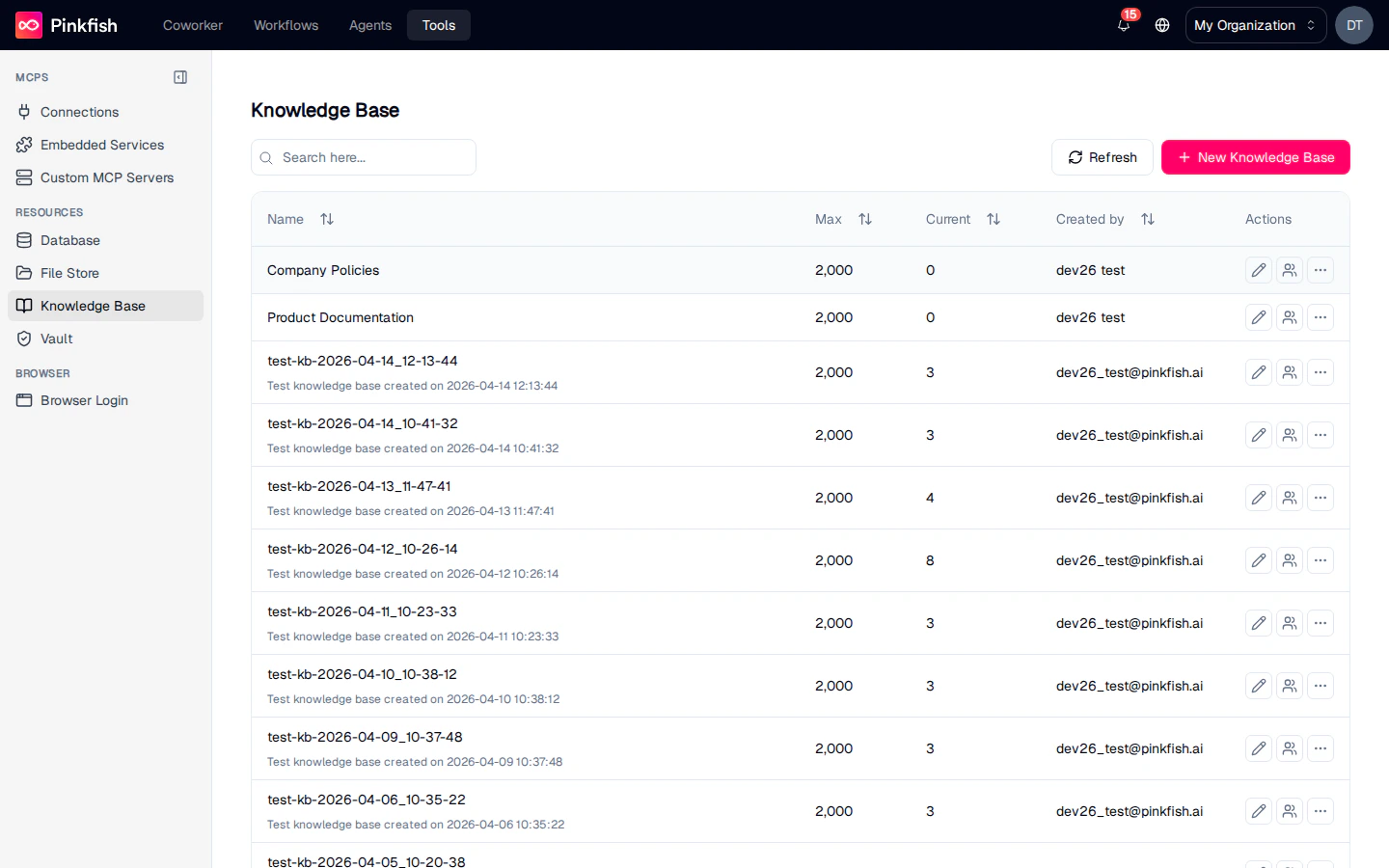
The Knowledge Base List
Each row is one indexed document collection. Columns match the other resource lists:| Column | Description |
|---|---|
| Name | Collection name. |
| Max | Max file count allowed. |
| Current | Current indexed-file count. |
| Created by | Email of the creator. |
| Actions | Share, Rename, More (Delete, Export). |
Inside a Collection
Clicking a collection row opens the KB detail view.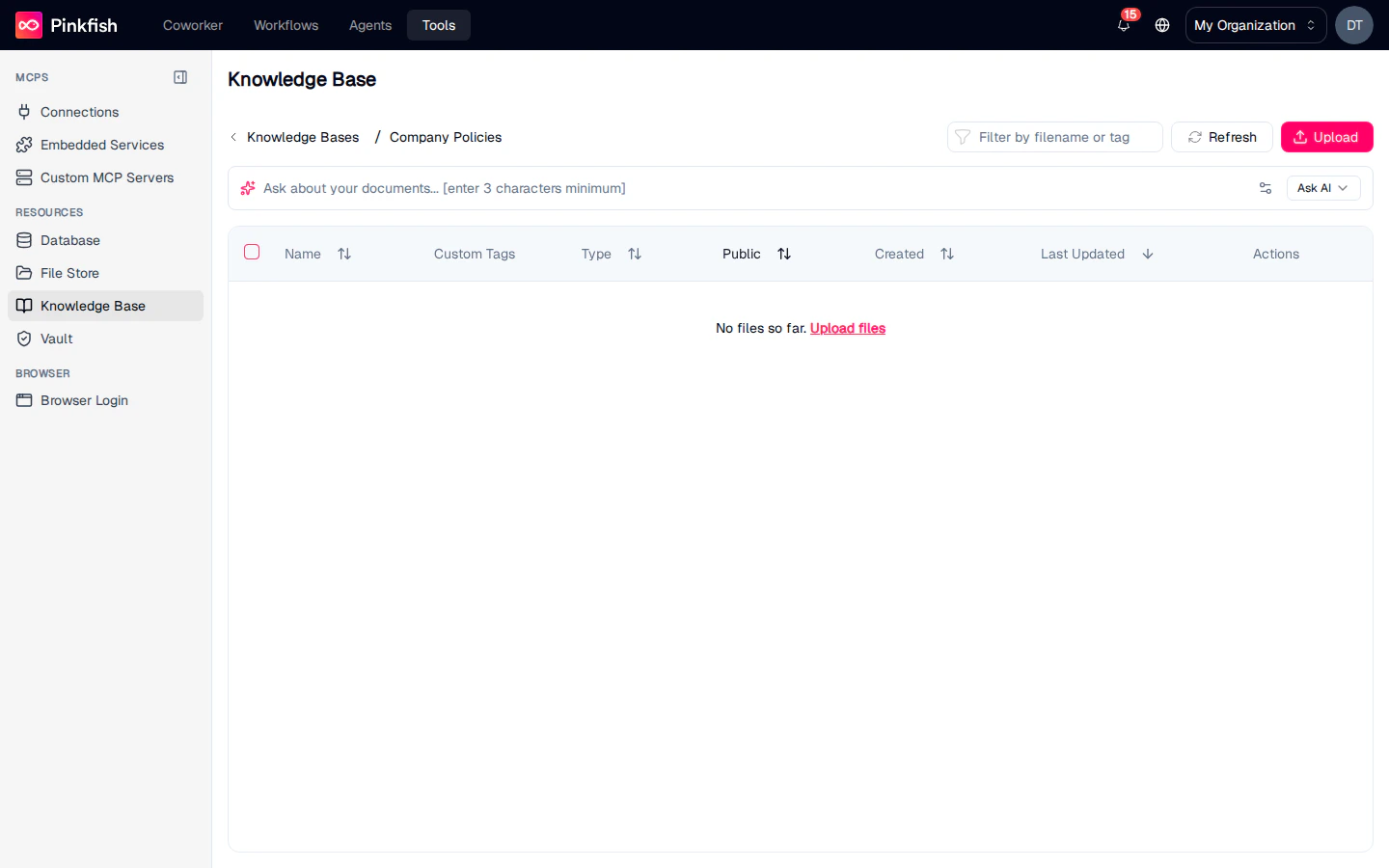
| Button | Action |
|---|---|
| Filter by filename or tag | Narrow the file list. |
| Refresh | Re-fetch the list. |
| Upload | Add files to be indexed. |
| Ask AI | Open a natural-language Q&A panel scoped to the collection. |
Ask AI bar
The prominent prompt row at the top of the collection (Ask about your documents… (enter 3 characters minimum)) runs a semantic search across every indexed file and returns the top passages with citations. This is the preferred way to explore what the KB contains before you wire it into an agent.
File table
Each file you upload indexes in the background. Rows show:| Column | Description |
|---|---|
| Name | Filename. |
| Custom Tags | Tags you apply for grouping (e.g. policy, onboarding, Q4-2025). |
| Type | Inferred file type. |
| Public | Whether the file has a public URL. |
| Created / Last Updated | Timestamps. |
| Actions | Edit metadata, Delete. |
Empty state
A brand-new knowledge base showsNo files so far. Upload files — click Upload files or the Upload button in the toolbar to get started.
Uploading Documents
Supported formats include PDF, DOCX, TXT, MD, HTML, and JSON. Bulk-upload by dragging multiple files onto the Upload button. Workflows can also write directly to a knowledge base — for example, a scheduled job that syncs a Google Drive folder into a KB, or a document processing step that extracts text from scans.Sharing
Share individual collections with read, write, or admin permissions. Knowledge bases are often shared org-wide so every agent can reach the same source of truth.Using Knowledge Bases in Agents and Workflows
Agents use the Knowledge Base MCP server to search and retrieve. Tools include:- Search — semantic query with optional filters.
- List files — enumerate what’s in a collection.
- Upload / delete — manage files programmatically.
- Give a customer-support agent a KB of product docs so it can answer grounded questions.
- Point an HR agent at the employee handbook.
- Keep an always-up-to-date KB of release notes and use it to answer “what changed in the last release?”
Notes
- Knowledge Base is available to every user (not builder-gated).
- Very large documents (100+ MB) are chunked into multiple index entries; the file row count still reflects the source file count, not the chunk count.
- For raw file storage without indexing, use File Store. For structured data, use Database.