> ## Documentation Index
> Fetch the complete documentation index at: https://docs.pinkfish.ai/llms.txt
> Use this file to discover all available pages before exploring further.
# Tools
> The hub for every capability an agent can use — MCPs, resources, and browser logins
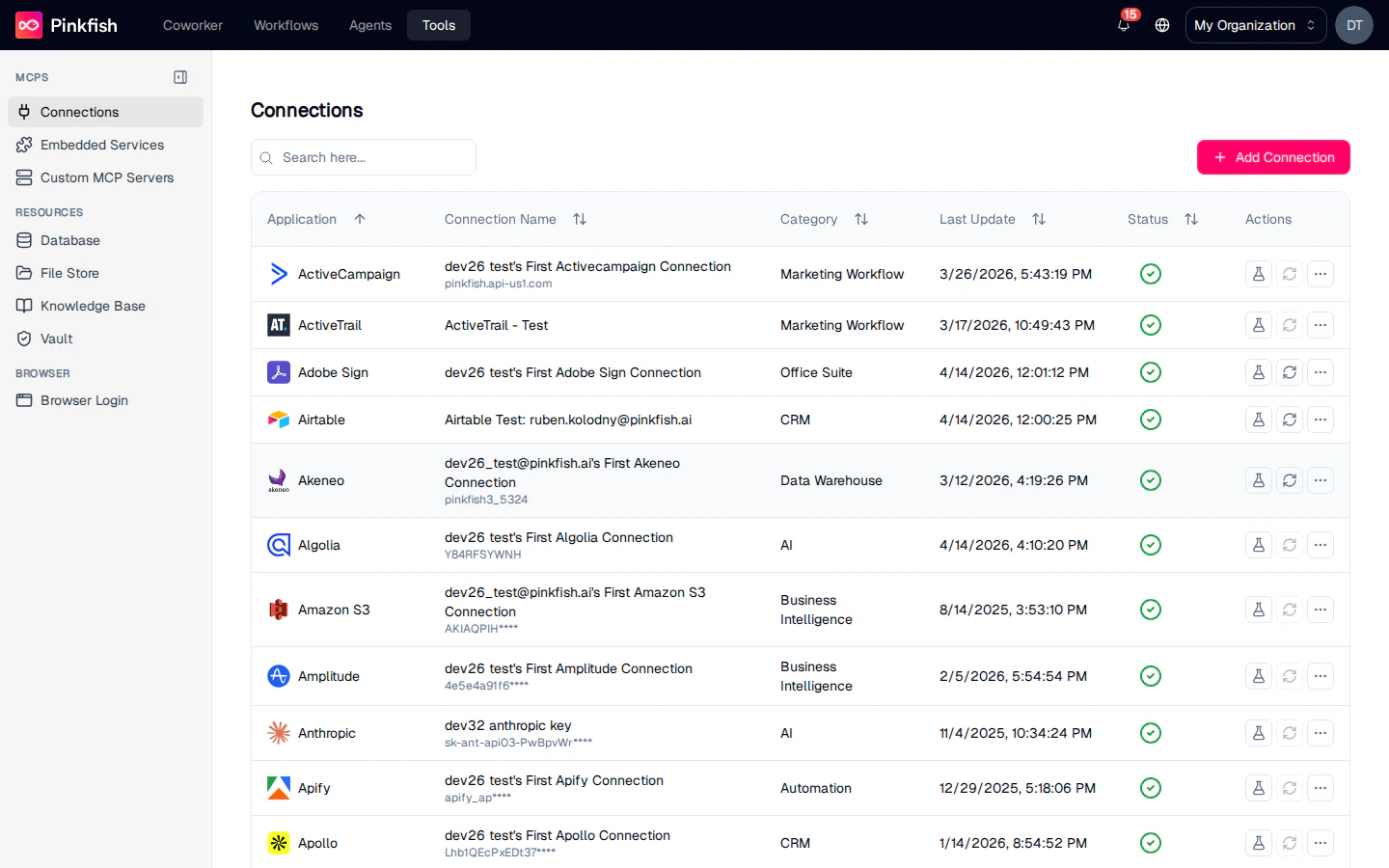
**Tools** is the area of Pinkfish where you manage everything an agent can reach out to. It has three top-level categories — **MCPs**, **Resources**, and **Browser** — and each category has its own dedicated pages for configuration, testing, and monitoring.
Navigate to **Tools** from the top nav. The page opens on the first MCPs sub-section, **Connections**.
 ## How Tools is Organized
The left sidebar groups everything into three categories. Each item in the sidebar is its own feature with its own page.
## How Tools is Organized
The left sidebar groups everything into three categories. Each item in the sidebar is its own feature with its own page.
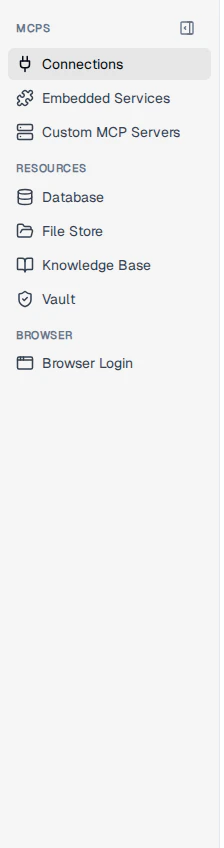 Everything an agent calls as an MCP tool — connected third-party apps, Pinkfish's built-in services, and custom MCP servers your org has registered.
Structured and unstructured data your agents read from and write to — databases, file stores, knowledge bases, and secret vaults.
Authenticated browser sessions for services that don't expose an API.
## MCPs
Every tool an agent can call is exposed as an MCP (Model Context Protocol) server. This category has three dedicated pages:
Third-party app integrations (Salesforce, Slack, Google Sheets, and hundreds more) plus the flow for building your own custom integration with OAuth, API Key, or Basic Auth.
Pinkfish's built-in MCP servers — web search, charting, email, code execution, document processing, and more. Always available, no setup.
Remote MCP servers you register with your org so their tools join the agent catalog alongside connections and embedded services.
## Resources
Resources hold the data agents work with. Each resource is organized into **collections** that you can share, reference from workflows, and version.
Structured tables with schemas (customers, orders, inventory), and unstructured document stores for semi-structured payloads.
Unstructured file collections for documents, exports, uploads, and generated artifacts.
Indexed document collections that agents can query with natural-language retrieval.
Encrypted storage for API keys, passwords, and other secrets, referenced from workflows without exposing raw values.
## Browser
Saved browser sessions for services that don't offer an API. Once stored, workflows can drive the `/scraper` and `/browser session` skills against them.
## Who Sees What
The Tools page respects role and plan:
| Section | Role gate | Plan gate |
| ------------------ | --------- | ------------- |
| Connections | — | — |
| Embedded Services | Builder | — |
| Custom MCP Servers | — | — |
| Database | Builder | — |
| File Store | Builder | — |
| Knowledge Base | — | — |
| Vault | Builder | eligible plan |
| Browser Login | Builder | — |
Shared items (connections, collections) show a small "Shared" indicator next to the name regardless of category.
## Next Steps
* Start with [Connections](/tools/connections) to wire up your first third-party app.
* Spin up a [Database](/resources/database) or [Knowledge Base](/resources/knowledge-base) to give your agent something to read and write.
* Review [Embedded Services](/tools/embedded-services) for the capabilities that ship with Pinkfish.
Everything an agent calls as an MCP tool — connected third-party apps, Pinkfish's built-in services, and custom MCP servers your org has registered.
Structured and unstructured data your agents read from and write to — databases, file stores, knowledge bases, and secret vaults.
Authenticated browser sessions for services that don't expose an API.
## MCPs
Every tool an agent can call is exposed as an MCP (Model Context Protocol) server. This category has three dedicated pages:
Third-party app integrations (Salesforce, Slack, Google Sheets, and hundreds more) plus the flow for building your own custom integration with OAuth, API Key, or Basic Auth.
Pinkfish's built-in MCP servers — web search, charting, email, code execution, document processing, and more. Always available, no setup.
Remote MCP servers you register with your org so their tools join the agent catalog alongside connections and embedded services.
## Resources
Resources hold the data agents work with. Each resource is organized into **collections** that you can share, reference from workflows, and version.
Structured tables with schemas (customers, orders, inventory), and unstructured document stores for semi-structured payloads.
Unstructured file collections for documents, exports, uploads, and generated artifacts.
Indexed document collections that agents can query with natural-language retrieval.
Encrypted storage for API keys, passwords, and other secrets, referenced from workflows without exposing raw values.
## Browser
Saved browser sessions for services that don't offer an API. Once stored, workflows can drive the `/scraper` and `/browser session` skills against them.
## Who Sees What
The Tools page respects role and plan:
| Section | Role gate | Plan gate |
| ------------------ | --------- | ------------- |
| Connections | — | — |
| Embedded Services | Builder | — |
| Custom MCP Servers | — | — |
| Database | Builder | — |
| File Store | Builder | — |
| Knowledge Base | — | — |
| Vault | Builder | eligible plan |
| Browser Login | Builder | — |
Shared items (connections, collections) show a small "Shared" indicator next to the name regardless of category.
## Next Steps
* Start with [Connections](/tools/connections) to wire up your first third-party app.
* Spin up a [Database](/resources/database) or [Knowledge Base](/resources/knowledge-base) to give your agent something to read and write.
* Review [Embedded Services](/tools/embedded-services) for the capabilities that ship with Pinkfish.