> ## Documentation Index
> Fetch the complete documentation index at: https://docs.pinkfish.ai/llms.txt
> Use this file to discover all available pages before exploring further.
# Embedded Services
> Pinkfish's built-in MCP servers — always available to every agent in your org
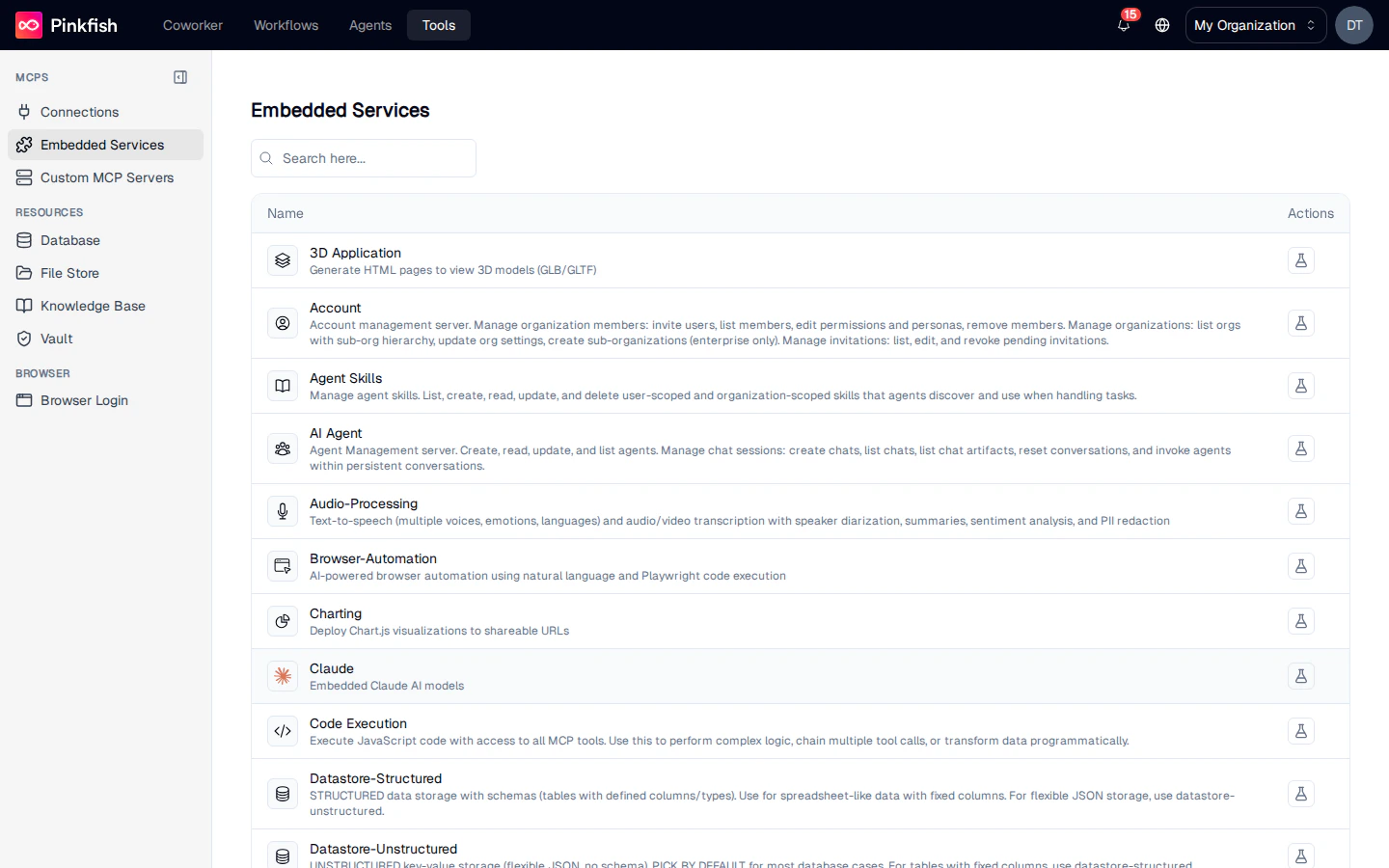
**Embedded Services** are the MCP servers that ship with Pinkfish. Unlike [Connections](/tools/connections), they don't require authentication or setup — every agent in your org can call them the moment it starts. They cover the capabilities most workflows reach for first: web search, code execution, charting, document processing, image and video work, email, and reading from your own [resources](/tools/overview#resources).
Find them under **Tools → Embedded Services**.
 ## What's Available
Embedded services are grouped by what they do. The exact catalog in your org depends on plan and feature flags; the common set includes:
| Category | Services |
| ------------- | ------------------------------------------------------------------------------------------------ |
| Web | Web Search, Web Scraping, HTTP Utilities |
| Content | Charting, Image Processing, Audio Processing, Video Processing, Document Processing |
| Data | Datastore (Structured), Datastore (Unstructured), File Storage, Knowledge Base, Queue Management |
| Agent runtime | Code Execution, Browser Automation, Email, Vault, Agent Skills |
| Application | 3D Application, Web Application, Artifact Tools |
Each row shows the service's display name, a description, and a **Test MCP tools** action.
For the full reference of every tool each service exposes, see [Embedded MCP Servers](/api-reference/mcp-servers/embedded/overview).
## Testing a Service
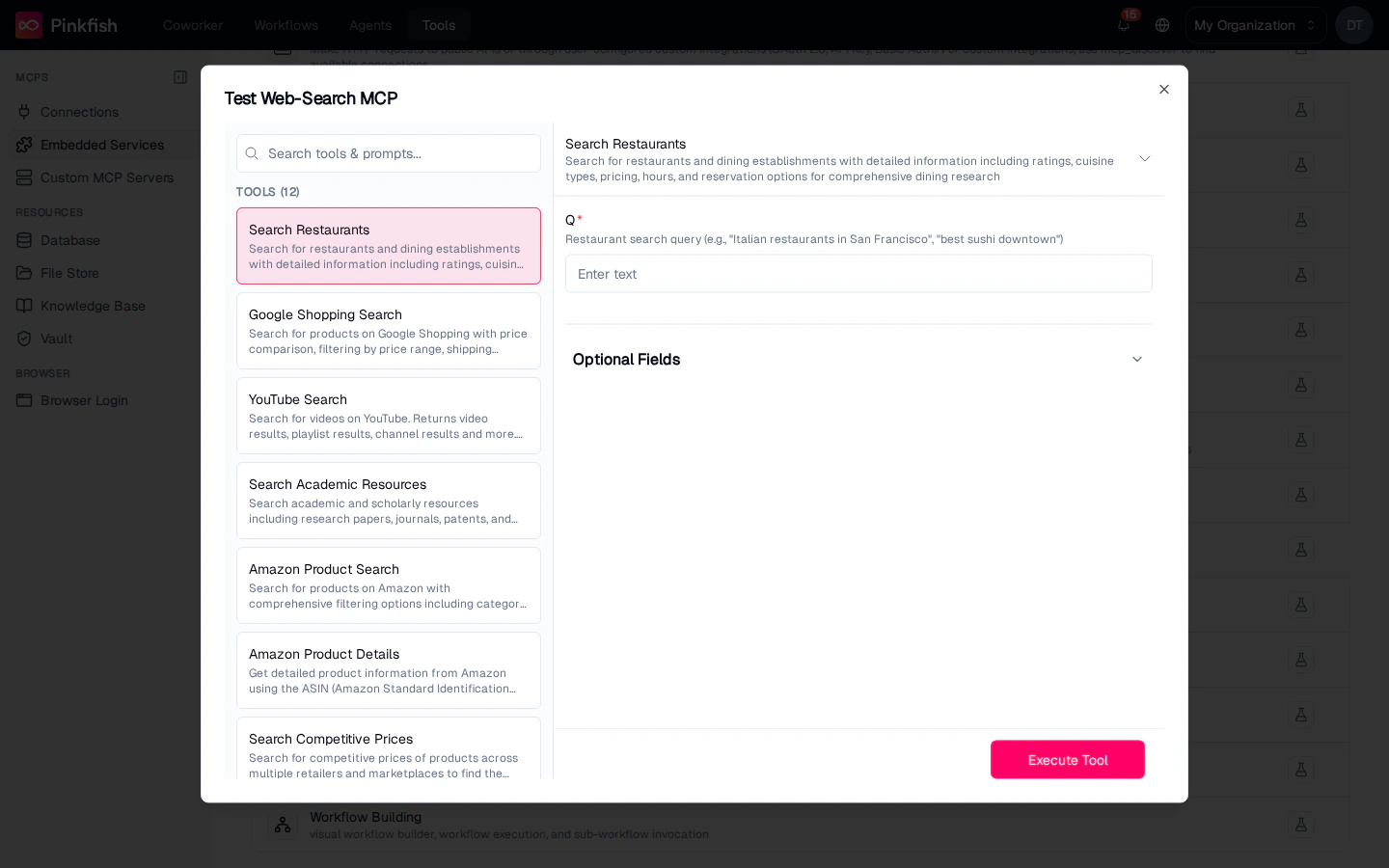
Click the flask icon on any row to open the **Test {Service} MCP** dialog. The left panel lists every tool the service provides; the right panel renders a form generated from the tool's input schema.
## What's Available
Embedded services are grouped by what they do. The exact catalog in your org depends on plan and feature flags; the common set includes:
| Category | Services |
| ------------- | ------------------------------------------------------------------------------------------------ |
| Web | Web Search, Web Scraping, HTTP Utilities |
| Content | Charting, Image Processing, Audio Processing, Video Processing, Document Processing |
| Data | Datastore (Structured), Datastore (Unstructured), File Storage, Knowledge Base, Queue Management |
| Agent runtime | Code Execution, Browser Automation, Email, Vault, Agent Skills |
| Application | 3D Application, Web Application, Artifact Tools |
Each row shows the service's display name, a description, and a **Test MCP tools** action.
For the full reference of every tool each service exposes, see [Embedded MCP Servers](/api-reference/mcp-servers/embedded/overview).
## Testing a Service
Click the flask icon on any row to open the **Test {Service} MCP** dialog. The left panel lists every tool the service provides; the right panel renders a form generated from the tool's input schema.
 Typical flow:
1. Select a tool on the left (e.g. **Google Web Search**).
2. Fill in the required parameters (e.g. `query`) and any **Optional Fields**.
3. Click **Execute Test**.
4. Inspect the live response in the result panel below.
Use this whenever you want to learn what a tool expects before wiring it into an agent or workflow.
## Using Embedded Services in Agents and Workflows
Embedded services are available to every agent without wiring. Reference them by name in the agent builder's tool list, or invoke them from a workflow step. Because they're always on, you don't need to pick a connection at call time — just pick the tool.
For details on each service, open the [Embedded MCP Servers reference](/api-reference/mcp-servers/embedded/overview).
## Notes
* Embedded Services requires the Builder role to view from the Tools page.
* The catalog is curated by Pinkfish; new services appear automatically as they're released.
* Services like Vault and Knowledge Base operate on your own [resources](/tools/overview#resources) — test calls operate on real data, so treat them with the same care you would in a production workflow.
Typical flow:
1. Select a tool on the left (e.g. **Google Web Search**).
2. Fill in the required parameters (e.g. `query`) and any **Optional Fields**.
3. Click **Execute Test**.
4. Inspect the live response in the result panel below.
Use this whenever you want to learn what a tool expects before wiring it into an agent or workflow.
## Using Embedded Services in Agents and Workflows
Embedded services are available to every agent without wiring. Reference them by name in the agent builder's tool list, or invoke them from a workflow step. Because they're always on, you don't need to pick a connection at call time — just pick the tool.
For details on each service, open the [Embedded MCP Servers reference](/api-reference/mcp-servers/embedded/overview).
## Notes
* Embedded Services requires the Builder role to view from the Tools page.
* The catalog is curated by Pinkfish; new services appear automatically as they're released.
* Services like Vault and Knowledge Base operate on your own [resources](/tools/overview#resources) — test calls operate on real data, so treat them with the same care you would in a production workflow.