> ## Documentation Index
> Fetch the complete documentation index at: https://docs.pinkfish.ai/llms.txt
> Use this file to discover all available pages before exploring further.
# Knowledge Base
> Indexed document collections for semantic retrieval inside agent conversations and workflows
**Knowledge Base** collections let you upload documents and then query them semantically from agents and workflows. Under the hood, Pinkfish chunks and indexes every file you add, so asking "what's our refund policy?" returns the right paragraph from the right document — not just whatever matches keywords. Knowledge bases are the canonical place for RAG-style retrieval inside Pinkfish.
Find it under **Tools → Knowledge Base**.
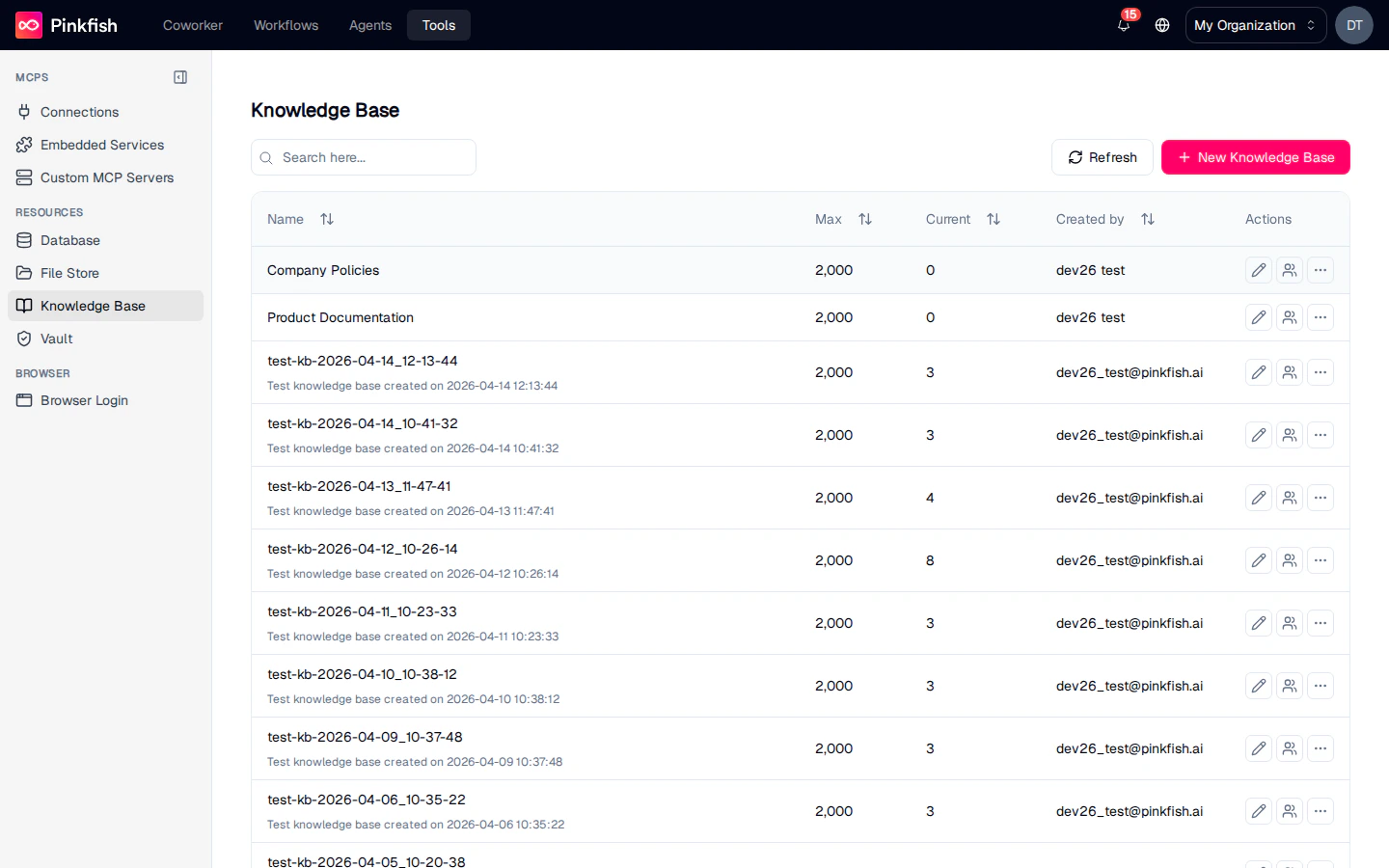 ## The Knowledge Base List
Each row is one indexed document collection. Columns match the other resource lists:
| Column | Description |
| -------------- | ------------------------------------- |
| **Name** | Collection name. |
| **Max** | Max file count allowed. |
| **Current** | Current indexed-file count. |
| **Created by** | Email of the creator. |
| **Actions** | Share, Rename, More (Delete, Export). |
Click **+ New Knowledge Base** to create a collection.
## Inside a Collection
Clicking a collection row opens the KB detail view.
## The Knowledge Base List
Each row is one indexed document collection. Columns match the other resource lists:
| Column | Description |
| -------------- | ------------------------------------- |
| **Name** | Collection name. |
| **Max** | Max file count allowed. |
| **Current** | Current indexed-file count. |
| **Created by** | Email of the creator. |
| **Actions** | Share, Rename, More (Delete, Export). |
Click **+ New Knowledge Base** to create a collection.
## Inside a Collection
Clicking a collection row opens the KB detail view.
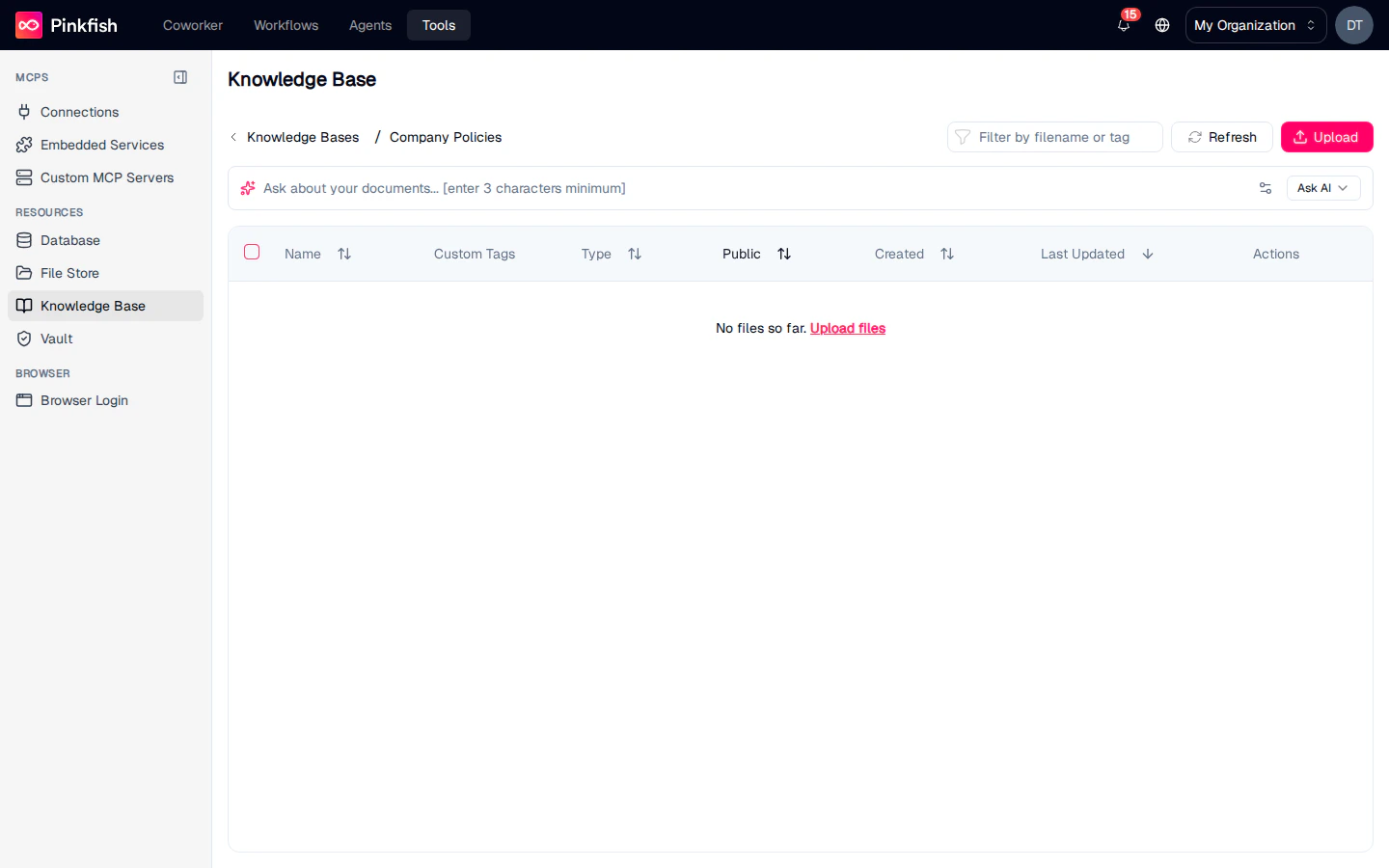 Toolbar:
| Button | Action |
| ----------------------------- | ------------------------------------------------------------ |
| **Filter by filename or tag** | Narrow the file list. |
| **Refresh** | Re-fetch the list. |
| **Upload** | Add files to be indexed. |
| **Ask AI** | Open a natural-language Q\&A panel scoped to the collection. |
### Ask AI bar
The prominent prompt row at the top of the collection (`Ask about your documents… (enter 3 characters minimum)`) runs a semantic search across every indexed file and returns the top passages with citations. This is the preferred way to explore what the KB contains before you wire it into an agent.
### File table
Each file you upload indexes in the background. Rows show:
| Column | Description |
| -------------------------- | --------------------------------------------------------------------- |
| **Name** | Filename. |
| **Custom Tags** | Tags you apply for grouping (e.g. `policy`, `onboarding`, `Q4-2025`). |
| **Type** | Inferred file type. |
| **Public** | Whether the file has a public URL. |
| **Created / Last Updated** | Timestamps. |
| **Actions** | Edit metadata, Delete. |
Indexing runs asynchronously — newly uploaded files appear in the list immediately, but may take a few seconds to show up in Ask AI results.
### Empty state
A brand-new knowledge base shows `No files so far. Upload files` — click **Upload files** or the **Upload** button in the toolbar to get started.
## Uploading Documents
Supported formats include PDF, DOCX, TXT, MD, HTML, and JSON. Bulk-upload by dragging multiple files onto the Upload button.
Workflows can also write directly to a knowledge base — for example, a scheduled job that syncs a Google Drive folder into a KB, or a document processing step that extracts text from scans.
## Sharing
Share individual collections with read, write, or admin permissions. Knowledge bases are often shared org-wide so every agent can reach the same source of truth.
## Using Knowledge Bases in Agents and Workflows
Agents use the [Knowledge Base MCP server](/api-reference/mcp-servers/embedded/knowledge-base) to search and retrieve. Tools include:
* **Search** — semantic query with optional filters.
* **List files** — enumerate what's in a collection.
* **Upload / delete** — manage files programmatically.
Common recipes:
* Give a customer-support agent a KB of product docs so it can answer grounded questions.
* Point an HR agent at the employee handbook.
* Keep an always-up-to-date KB of release notes and use it to answer "what changed in the last release?"
## Notes
* Knowledge Base is available to every user (not builder-gated).
* Very large documents (100+ MB) are chunked into multiple index entries; the file row count still reflects the source file count, not the chunk count.
* For raw file storage without indexing, use [File Store](/resources/file-store). For structured data, use [Database](/resources/database).
Toolbar:
| Button | Action |
| ----------------------------- | ------------------------------------------------------------ |
| **Filter by filename or tag** | Narrow the file list. |
| **Refresh** | Re-fetch the list. |
| **Upload** | Add files to be indexed. |
| **Ask AI** | Open a natural-language Q\&A panel scoped to the collection. |
### Ask AI bar
The prominent prompt row at the top of the collection (`Ask about your documents… (enter 3 characters minimum)`) runs a semantic search across every indexed file and returns the top passages with citations. This is the preferred way to explore what the KB contains before you wire it into an agent.
### File table
Each file you upload indexes in the background. Rows show:
| Column | Description |
| -------------------------- | --------------------------------------------------------------------- |
| **Name** | Filename. |
| **Custom Tags** | Tags you apply for grouping (e.g. `policy`, `onboarding`, `Q4-2025`). |
| **Type** | Inferred file type. |
| **Public** | Whether the file has a public URL. |
| **Created / Last Updated** | Timestamps. |
| **Actions** | Edit metadata, Delete. |
Indexing runs asynchronously — newly uploaded files appear in the list immediately, but may take a few seconds to show up in Ask AI results.
### Empty state
A brand-new knowledge base shows `No files so far. Upload files` — click **Upload files** or the **Upload** button in the toolbar to get started.
## Uploading Documents
Supported formats include PDF, DOCX, TXT, MD, HTML, and JSON. Bulk-upload by dragging multiple files onto the Upload button.
Workflows can also write directly to a knowledge base — for example, a scheduled job that syncs a Google Drive folder into a KB, or a document processing step that extracts text from scans.
## Sharing
Share individual collections with read, write, or admin permissions. Knowledge bases are often shared org-wide so every agent can reach the same source of truth.
## Using Knowledge Bases in Agents and Workflows
Agents use the [Knowledge Base MCP server](/api-reference/mcp-servers/embedded/knowledge-base) to search and retrieve. Tools include:
* **Search** — semantic query with optional filters.
* **List files** — enumerate what's in a collection.
* **Upload / delete** — manage files programmatically.
Common recipes:
* Give a customer-support agent a KB of product docs so it can answer grounded questions.
* Point an HR agent at the employee handbook.
* Keep an always-up-to-date KB of release notes and use it to answer "what changed in the last release?"
## Notes
* Knowledge Base is available to every user (not builder-gated).
* Very large documents (100+ MB) are chunked into multiple index entries; the file row count still reflects the source file count, not the chunk count.
* For raw file storage without indexing, use [File Store](/resources/file-store). For structured data, use [Database](/resources/database).