> ## Documentation Index
> Fetch the complete documentation index at: https://docs.pinkfish.ai/llms.txt
> Use this file to discover all available pages before exploring further.
# Platform API
> Programmatic access to the Pinkfish MCP Farm
HTTP access to the full MCP Farm tool catalog via a single auth flow and JSON-RPC 2.0.
## Get Started
Before you can make API calls, you need an **API key** and your **Organization ID**.
Sign up at [pinkfish.ai](https://pinkfish.ai) if you don't have an account.
Go to **Settings → API Keys → Create**. Copy the key immediately — it's only shown once.
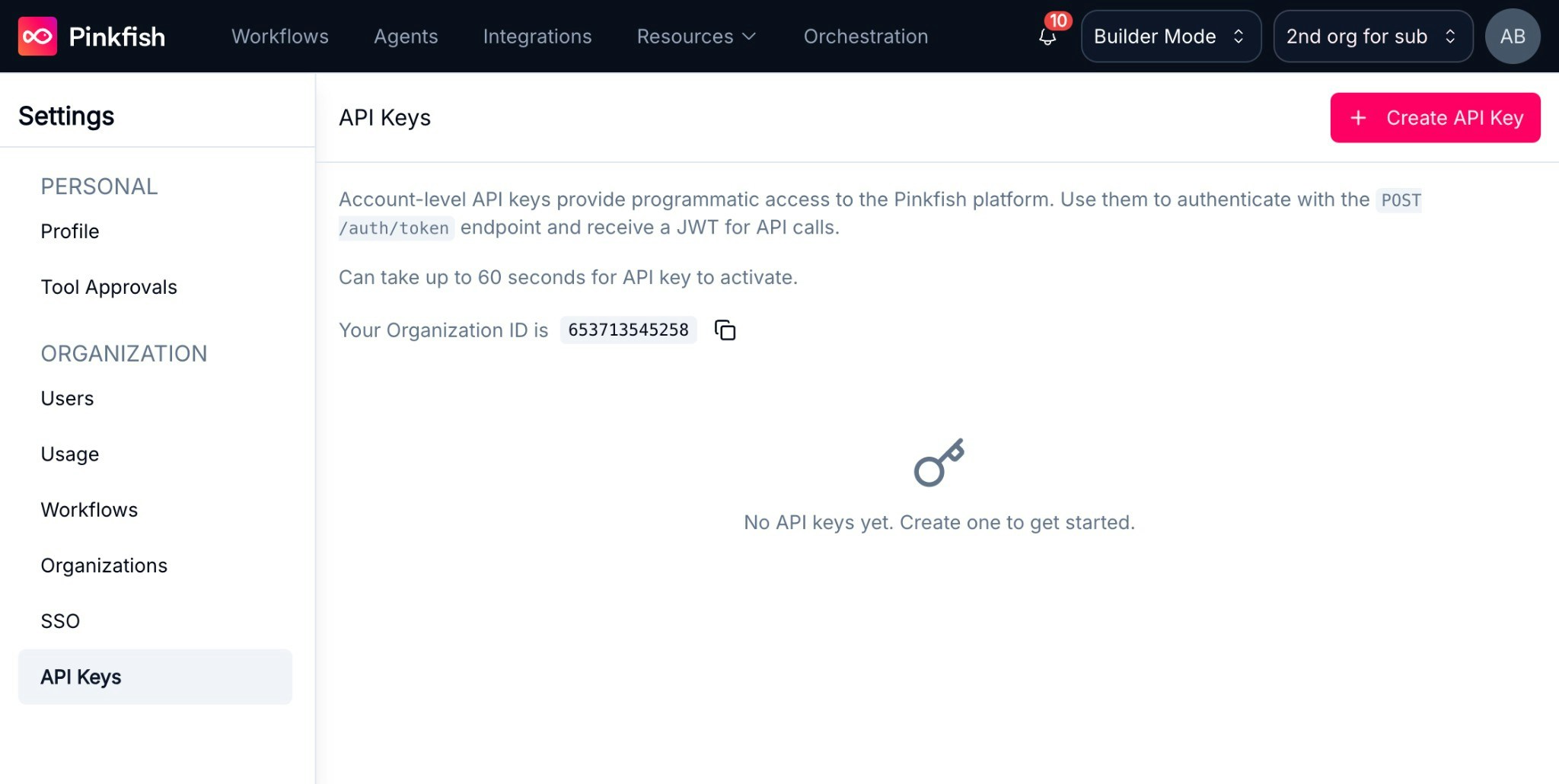 Your Organization ID is displayed on the **Settings → API Keys** page, or under **Settings → Organization**.
New API keys may take up to 60 seconds to activate.
## How It Works
Every API call follows two steps:
1. **Authenticate** — Exchange your API key for a short-lived runtime token (JWT, 60 min)
2. **Call a tool** — Send a JSON-RPC 2.0 request to the MCP Farm with your token
## Quick Start
Requires `curl` and `jq`. Replace `YOUR_API_KEY` and `YOUR_ORG_ID` with the values from the steps above.
```bash theme={null}
# 1. Exchange API key for runtime token
export PINKFISH_TOKEN=$(curl -s -X POST "https://app-api.app.pinkfish.ai/auth/token" \
-H "X-Api-Key: YOUR_API_KEY" \
-H "X-Selected-Org: YOUR_ORG_ID" \
-H "Content-Type: application/json" | jq -r '.token')
# 2. Call a tool
curl -s -X POST "https://mcp.app.pinkfish.ai/web-search" \
-H "Authorization: Bearer $PINKFISH_TOKEN" \
-H "Content-Type: application/json" \
-H "Accept: application/json" \
-d '{"jsonrpc":"2.0","method":"tools/call","params":{"name":"search_googlesearch","arguments":{"q":"latest AI news"}},"id":1}'
```
To use application MCPs like Google or Microsoft services (Gmail, Slack, Google Drive, etc.), you will additionally need to retrieve a PCID. See the [Connecting to MCPs](/api-reference/platform/connections) documentation to learn how.
## Key Concepts
| Concept | Description |
| ------------- | --------------------------------------------------------------------------------------------------------- |
| API Key | Account credential. Exchange for a runtime token. |
| Runtime Token | JWT from `/auth/token`. Bearer token for MCP Farm and other authenticated Pinkfish API requests (60 min). |
| MCP Farm | JSON-RPC 2.0 gateway over HTTPS. |
| Server | Tool collection (e.g. `gmail`, `web-search`). |
| Tool | Callable action (e.g. `search_googlesearch`, `gmail_search_emails`). |
| PCID | Connection ID. Required for OAuth integrations (Gmail, Slack). |
## Base URLs
| Service | URL |
| ------------ | ------------------------------------------------------------------ |
| Platform API | [https://app-api.app.pinkfish.ai](https://app-api.app.pinkfish.ai) |
| MCP Farm | [https://mcp.app.pinkfish.ai](https://mcp.app.pinkfish.ai) |
| PinkConnect | [https://proxy.pinkfish.ai](https://proxy.pinkfish.ai) |
## Learn More
| Page | Description |
| ------------------------------------------------------------------ | ---------------------------------------------- |
| [Authentication](/api-reference/platform/authentication) | API keys and runtime tokens |
| [MCP Protocol](/api-reference/platform/making-requests) | Request format, list servers, call tools |
| [Connecting to MCPs](/api-reference/platform/connections) | PCIDs and external integrations |
| [Discovery](/api-reference/platform/discovery) | Find tools using natural language |
| [Discover, Install, and Invoke](/api-reference/platform/discovery) | Find tools at runtime, add to agent, call them |
| [Bring Your Own Agent](/api-reference/platform/agent-prompt) | System prompt for connecting your own agent |
| [Pinkfish Agents](/api-reference/platform/agent-management) | Create, invoke, and manage Pinkfish agents |
| [Code Execution](/api-reference/platform/code-execution) | Sandboxed JavaScript for chaining tools |
| [Browser Automation](/api-reference/platform/browser-automation) | Natural language browser automation |
| [Workflows](/api-reference/platform/workflows) | Automations with triggers and scheduling |
## Limits
See [Rate Limits](/billing/limits#rate-limits) for per-service request limits.
Your Organization ID is displayed on the **Settings → API Keys** page, or under **Settings → Organization**.
New API keys may take up to 60 seconds to activate.
## How It Works
Every API call follows two steps:
1. **Authenticate** — Exchange your API key for a short-lived runtime token (JWT, 60 min)
2. **Call a tool** — Send a JSON-RPC 2.0 request to the MCP Farm with your token
## Quick Start
Requires `curl` and `jq`. Replace `YOUR_API_KEY` and `YOUR_ORG_ID` with the values from the steps above.
```bash theme={null}
# 1. Exchange API key for runtime token
export PINKFISH_TOKEN=$(curl -s -X POST "https://app-api.app.pinkfish.ai/auth/token" \
-H "X-Api-Key: YOUR_API_KEY" \
-H "X-Selected-Org: YOUR_ORG_ID" \
-H "Content-Type: application/json" | jq -r '.token')
# 2. Call a tool
curl -s -X POST "https://mcp.app.pinkfish.ai/web-search" \
-H "Authorization: Bearer $PINKFISH_TOKEN" \
-H "Content-Type: application/json" \
-H "Accept: application/json" \
-d '{"jsonrpc":"2.0","method":"tools/call","params":{"name":"search_googlesearch","arguments":{"q":"latest AI news"}},"id":1}'
```
To use application MCPs like Google or Microsoft services (Gmail, Slack, Google Drive, etc.), you will additionally need to retrieve a PCID. See the [Connecting to MCPs](/api-reference/platform/connections) documentation to learn how.
## Key Concepts
| Concept | Description |
| ------------- | --------------------------------------------------------------------------------------------------------- |
| API Key | Account credential. Exchange for a runtime token. |
| Runtime Token | JWT from `/auth/token`. Bearer token for MCP Farm and other authenticated Pinkfish API requests (60 min). |
| MCP Farm | JSON-RPC 2.0 gateway over HTTPS. |
| Server | Tool collection (e.g. `gmail`, `web-search`). |
| Tool | Callable action (e.g. `search_googlesearch`, `gmail_search_emails`). |
| PCID | Connection ID. Required for OAuth integrations (Gmail, Slack). |
## Base URLs
| Service | URL |
| ------------ | ------------------------------------------------------------------ |
| Platform API | [https://app-api.app.pinkfish.ai](https://app-api.app.pinkfish.ai) |
| MCP Farm | [https://mcp.app.pinkfish.ai](https://mcp.app.pinkfish.ai) |
| PinkConnect | [https://proxy.pinkfish.ai](https://proxy.pinkfish.ai) |
## Learn More
| Page | Description |
| ------------------------------------------------------------------ | ---------------------------------------------- |
| [Authentication](/api-reference/platform/authentication) | API keys and runtime tokens |
| [MCP Protocol](/api-reference/platform/making-requests) | Request format, list servers, call tools |
| [Connecting to MCPs](/api-reference/platform/connections) | PCIDs and external integrations |
| [Discovery](/api-reference/platform/discovery) | Find tools using natural language |
| [Discover, Install, and Invoke](/api-reference/platform/discovery) | Find tools at runtime, add to agent, call them |
| [Bring Your Own Agent](/api-reference/platform/agent-prompt) | System prompt for connecting your own agent |
| [Pinkfish Agents](/api-reference/platform/agent-management) | Create, invoke, and manage Pinkfish agents |
| [Code Execution](/api-reference/platform/code-execution) | Sandboxed JavaScript for chaining tools |
| [Browser Automation](/api-reference/platform/browser-automation) | Natural language browser automation |
| [Workflows](/api-reference/platform/workflows) | Automations with triggers and scheduling |
## Limits
See [Rate Limits](/billing/limits#rate-limits) for per-service request limits.