> ## Documentation Index
> Fetch the complete documentation index at: https://docs.pinkfish.ai/llms.txt
> Use this file to discover all available pages before exploring further.
# google-chat-api-messages
> Google Chat Messages
**Server path:** `/google-chat-api-messages` | **Type:** Application | **PCID required:** Yes
## Tools
| Tool | Description |
| --------------------------------------------------------------------------------------- | ------------------------------------------------------------------------------------------------------------- |
| [`google-chat-api-messages_create_message`](#google-chat-api-messages_create_message) | Creates a message in a Google Chat space. |
| [`google-chat-api-messages_create_reaction`](#google-chat-api-messages_create_reaction) | Creates a reaction and adds it to a message. |
| [`google-chat-api-messages_delete_message`](#google-chat-api-messages_delete_message) | Deletes a message. |
| [`google-chat-api-messages_delete_reaction`](#google-chat-api-messages_delete_reaction) | Deletes a reaction to a message. |
| [`google-chat-api-messages_get_attachment`](#google-chat-api-messages_get_attachment) | Gets the metadata of a message attachment. |
| [`google-chat-api-messages_get_message`](#google-chat-api-messages_get_message) | Returns details about a message. |
| [`google-chat-api-messages_list_messages`](#google-chat-api-messages_list_messages) | Lists messages in a space that the caller is a member of, including messages from blocked members and spaces. |
| [`google-chat-api-messages_list_reactions`](#google-chat-api-messages_list_reactions) | Lists reactions to a message. |
| [`google-chat-api-messages_update_message`](#google-chat-api-messages_update_message) | Updates a message. |
***
## google-chat-api-messages\_create\_message
Creates a message in a Google Chat space.
**Parameters:**
| Parameter | Type | Required | Default | Description |
| --------------------------------------------------- | --------- | -------- | ------- | ---------------------------------------------------------------------------------------------------------------------------------------------------------------------------------------------------------------------------------------------------------------------------------------------------------------------------------------------------------------------------------------------------------------------------------------------------------------------------------------------------------------------------------------------------------------------------------------------------------------------------------------------------------------------------------------------------------------------------------------------------------------------------------------------------------------------------------------------------------------------------------------------------------------------------------------------------------------------------------------------------------------------------------------------------------------------------------------- |
| `threadKey` | string | No | — | Optional. Deprecated: Use thread.thread\_key instead. ID for the thread. Supports up to 4000 characters. To start or add to a thread, create a message and specify a `threadKey` or the thread.name. For example usage, see [Start or reply to a message thread](https://developers.google.com/workspace/chat/create-messages#create-message-thread). |
| `requestId` | string | No | — | Optional. A unique request ID for this message. Specifying an existing request ID returns the message created with that ID instead of creating a new message. |
| `messageReplyOption` | string | No | — | Optional. Specifies whether a message starts a thread or replies to one. Only supported in named spaces. When [responding to user interactions](https://developers.google.com/workspace/chat/receive-respond-interactions), this field is ignored. For interactions within a thread, the reply is created in the same thread. Otherwise, the reply is created as a new thread. |
| `messageId` | string | No | — | Optional. A custom ID for a message. Lets Chat apps get, update, or delete a message without needing to store the system-assigned ID in the message's resource name (represented in the message `name` field). The value for this field must meet the following requirements: \* Begins with `client-`. For example, `client-custom-name` is a valid custom ID, but `custom-name` is not. \* Contains up to 63 characters and only lowercase letters, numbers, and hyphens. \* Is unique within a space. A Chat app can't use the same custom ID for different messages. For details, see [Name a message](https://developers.google.com/workspace/chat/create-messages#name_a_created_message). |
| `createMessageNotificationOptions.notificationType` | string | No | — | The notification type for the message. |
| `spacesId` | string | Yes | — | The ID of the spaces. |
| `accessoryWidgets` | object\[] | No | — | Optional. One or more interactive widgets that appear at the bottom of a message. You can add accessory widgets to messages that contain text, cards, or both text and cards. Not supported for messages that contain dialogs. For details, see [Add interactive widgets at the bottom of a message](https://developers.google.com/workspace/chat/create-messages#add-accessory-widgets). Creating a message with accessory widgets requires \[app authentication] ([https://developers.google.com/workspace/chat/authenticate-authorize-chat-app](https://developers.google.com/workspace/chat/authenticate-authorize-chat-app)). |
| `actionResponse` | object | No | — | Parameters that a Chat app can use to configure how its response is posted. |
| `annotations` | object\[] | No | — | Output only. Annotations can be associated with the plain-text body of the message or with chips that link to Google Workspace resources like Google Docs or Sheets with `start_index` and `length` of 0. |
| `argumentText` | string | No | — | Output only. Plain-text body of the message with all Chat app mentions stripped out. |
| `attachedGifs` | object\[] | No | — | Output only. GIF images that are attached to the message. |
| `attachment` | object\[] | No | — | Optional. User-uploaded attachment. |
| `cards` | object\[] | No | — | Deprecated: Use `cards_v2` instead. Rich, formatted, and interactive cards that you can use to display UI elements such as: formatted texts, buttons, and clickable images. Cards are normally displayed below the plain-text body of the message. `cards` and `cards_v2` can have a maximum size of 32 KB. |
| `cardsV2` | object\[] | No | — | Optional. An array of [cards](https://developers.google.com/workspace/chat/api/reference/rest/v1/cards). Chat apps can create cards with [app authentication](https://developers.google.com/workspace/chat/authenticate-authorize-chat-app). As part of the [Developer Preview Program](https://developers.google.com/workspace/preview), if your Chat app [authenticates as a user](https://developers.google.com/workspace/chat/authenticate-authorize-chat-user), it can create card messages. If your Chat app is not part of Developer Preview Program, it can't create cards with user authentication. To learn how to create a message that contains cards, see [Send a message](https://developers.google.com/workspace/chat/create-messages). [Card builder](https://addons.gsuite.google.com/uikit/builder) |
| `clientAssignedMessageId` | string | No | — | Optional. A custom ID for the message. You can use field to identify a message, or to get, delete, or update a message. To set a custom ID, specify the [`messageId`](https://developers.google.com/workspace/chat/api/reference/rest/v1/spaces.messages/create#body.QUERY_PARAMETERS.message_id) field when you create the message. For details, see [Name a message](https://developers.google.com/workspace/chat/create-messages#name_a_created_message). |
| `createTime` | string | No | — | Optional. Immutable. For spaces created in Chat, the time at which the message was created. This field is output only, except when used in import mode spaces. For import mode spaces, set this field to the historical timestamp at which the message was created in the source in order to preserve the original creation time. |
| `deleteTime` | string | No | — | Output only. The time at which the message was deleted in Google Chat. If the message is never deleted, this field is empty. |
| `deletionMetadata` | object | No | — | Information about a deleted message. A message is deleted when `delete_time` is set. |
| `emojiReactionSummaries` | object\[] | No | — | Output only. The list of emoji reaction summaries on the message. |
| `fallbackText` | string | No | — | Optional. A plain-text description of the message's cards, used when the actual cards can't be displayed—for example, mobile notifications. |
| `formattedText` | string | No | — | Output only. Contains the message `text` with markups added to communicate formatting. This field might not capture all formatting visible in the UI, but includes the following: \* [Markup syntax](https://developers.google.com/workspace/chat/format-messages) for bold, italic, strikethrough, monospace, monospace block, bulleted list, and block quote. \* [User mentions](https://developers.google.com/workspace/chat/format-messages#messages-@mention) using the format ``. * Custom hyperlinks using the format `<{url}\|{rendered_text}>` where the first string is the URL and the second is the rendered text—for example, ``. \* Custom emoji using the format `:{emoji_name}:`—for example, `:smile:`. This doesn't apply to Unicode emoji, such as `U+1F600` for a grinning face emoji. \* Bullet list items using asterisks (`*`)—for example, `* item`. For more information, see [View text formatting sent in a message](https://developers.google.com/workspace/chat/format-messages#view_text_formatting_sent_in_a_message) |
| `lastUpdateTime` | string | No | — | Output only. The time at which the message was last edited by a user. If the message has never been edited, this field is empty. |
| `matchedUrl` | object | No | — | A matched URL in a Chat message. Chat apps can preview matched URLs. For more information, see [Preview links](https://developers.google.com/chat/how-tos/preview-links). |
| `name` | string | No | — | Identifier. Resource name of the message. Format: `spaces/{space}/messages/{message}` Where `{space}` is the ID of the space where the message is posted and `{message}` is a system-assigned ID for the message. For example, `spaces/AAAAAAAAAAA/messages/BBBBBBBBBBB.BBBBBBBBBBB`. If you set a custom ID when you create a message, you can use this ID to specify the message in a request by replacing `{message}` with the value from the `clientAssignedMessageId` field. For example, `spaces/AAAAAAAAAAA/messages/client-custom-name`. For details, see [Name a message](https://developers.google.com/workspace/chat/create-messages#name_a_created_message). |
| `privateMessageViewer` | object | No | — | A user in Google Chat. When returned as an output from a request, if your Chat app [authenticates as a user](https://developers.google.com/workspace/chat/authenticate-authorize-chat-user), the output for a `User` resource only populates the user's `name` and `type`. |
| `quotedMessageMetadata` | object | No | — | Information about a message that another message quotes. When you update a message, you can't add or replace the `quotedMessageMetadata` field, but you can remove it. For example usage, see [Quote another message](https://developers.google.com/workspace/chat/create-messages#quote-a-message). |
| `sender` | object | No | — | A user in Google Chat. When returned as an output from a request, if your Chat app [authenticates as a user](https://developers.google.com/workspace/chat/authenticate-authorize-chat-user), the output for a `User` resource only populates the user's `name` and `type`. |
| `silent` | boolean | No | — | Output only. Whether this is a silent message. Silent messages are messages where Chat suppresses push notifications for recipients. |
| `slashCommand` | object | No | — | Metadata about a [slash command](https://developers.google.com/workspace/chat/commands) in Google Chat. |
| `space` | object | No | — | A space in Google Chat. Spaces are conversations between two or more users or 1:1 messages between a user and a Chat app. |
| `text` | string | No | — | Optional. Plain-text body of the message. The first link to an image, video, or web page generates a [preview chip](https://developers.google.com/workspace/chat/preview-links). You can also [@mention a Google Chat user](https://developers.google.com/workspace/chat/format-messages#messages-@mention), or everyone in the space. To learn about creating text messages, see [Send a message](https://developers.google.com/workspace/chat/create-messages). |
| `thread` | object | No | — | A thread in a Google Chat space. For example usage, see [Start or reply to a message thread](https://developers.google.com/workspace/chat/create-messages#create-message-thread). If you specify a thread when creating a message, you can set the [`messageReplyOption`](https://developers.google.com/workspace/chat/api/reference/rest/v1/spaces.messages/create#messagereplyoption) field to determine what happens if no matching thread is found. |
| `threadReply` | boolean | No | — | Output only. When `true`, the message is a response in a reply thread. When `false`, the message is visible in the space's top-level conversation as either the first message of a thread or a message with no threaded replies. If the space doesn't support reply in threads, this field is always `false`. |
````json theme={null}
{
"type": "object",
"properties": {
"PCID": {
"type": "string",
"description": "Pink Connect ID for the authenticated connection"
},
"threadKey": {
"type": "string",
"description": "Optional. Deprecated: Use thread.thread_key instead. ID for the thread. Supports up to 4000 characters. To start or add to a thread, create a message and specify a `threadKey` or the thread.name. For example usage, see [Start or reply to a message thread](https://developers.google.com/workspace/chat/create-messages#create-message-thread)."
},
"requestId": {
"type": "string",
"description": "Optional. A unique request ID for this message. Specifying an existing request ID returns the message created with that ID instead of creating a new message."
},
"messageReplyOption": {
"type": "string",
"description": "Optional. Specifies whether a message starts a thread or replies to one. Only supported in named spaces. When [responding to user interactions](https://developers.google.com/workspace/chat/receive-respond-interactions), this field is ignored. For interactions within a thread, the reply is created in the same thread. Otherwise, the reply is created as a new thread.",
"enum": [
"MESSAGE_REPLY_OPTION_UNSPECIFIED",
"REPLY_MESSAGE_FALLBACK_TO_NEW_THREAD",
"REPLY_MESSAGE_OR_FAIL"
]
},
"messageId": {
"type": "string",
"description": "Optional. A custom ID for a message. Lets Chat apps get, update, or delete a message without needing to store the system-assigned ID in the message's resource name (represented in the message `name` field). The value for this field must meet the following requirements: * Begins with `client-`. For example, `client-custom-name` is a valid custom ID, but `custom-name` is not. * Contains up to 63 characters and only lowercase letters, numbers, and hyphens. * Is unique within a space. A Chat app can't use the same custom ID for different messages. For details, see [Name a message](https://developers.google.com/workspace/chat/create-messages#name_a_created_message)."
},
"createMessageNotificationOptions.notificationType": {
"type": "string",
"description": "The notification type for the message.",
"enum": [
"NOTIFICATION_TYPE_NONE",
"NOTIFICATION_TYPE_FORCE_NOTIFY",
"NOTIFICATION_TYPE_SILENT"
]
},
"spacesId": {
"type": "string",
"description": "The ID of the spaces."
},
"accessoryWidgets": {
"type": "array",
"items": {
"type": "object",
"properties": {
"buttonList": {
"type": "object",
"description": "A list of buttons layed out horizontally. For an example in Google Chat apps, see [Add a button](https://developers.google.com/workspace/chat/design-interactive-card-dialog#add_a_button). [Google Workspace add-ons and Chat apps](https://developers.google.com/workspace/extend):"
}
}
},
"description": "Optional. One or more interactive widgets that appear at the bottom of a message. You can add accessory widgets to messages that contain text, cards, or both text and cards. Not supported for messages that contain dialogs. For details, see [Add interactive widgets at the bottom of a message](https://developers.google.com/workspace/chat/create-messages#add-accessory-widgets). Creating a message with accessory widgets requires [app authentication] (https://developers.google.com/workspace/chat/authenticate-authorize-chat-app)."
},
"actionResponse": {
"type": "object",
"description": "Parameters that a Chat app can use to configure how its response is posted.",
"properties": {
"dialogAction": {
"type": "object",
"description": "Contains a [dialog](https://developers.google.com/workspace/chat/dialogs) and request status code."
},
"type": {
"type": "string",
"description": "Input only. The type of Chat app response.",
"enum": [
"TYPE_UNSPECIFIED",
"NEW_MESSAGE",
"UPDATE_MESSAGE",
"UPDATE_USER_MESSAGE_CARDS",
"REQUEST_CONFIG",
"DIALOG",
"UPDATE_WIDGET"
]
},
"url": {
"type": "string",
"description": "Input only. URL for users to authenticate or configure. (Only for `REQUEST_CONFIG` response types.)"
},
"updatedWidget": {
"type": "object",
"description": "For `selectionInput` widgets, returns autocomplete suggestions for a multiselect menu."
}
}
},
"annotations": {
"type": "array",
"items": {
"type": "object",
"properties": {
"length": {
"type": "integer",
"format": "int32",
"description": "Length of the substring in the plain-text message body this annotation corresponds to. If not present, indicates a length of 0."
},
"customEmojiMetadata": {
"type": "object",
"description": "Annotation metadata for custom emoji."
},
"userMention": {
"type": "object",
"description": "Annotation metadata for user mentions (@)."
},
"slashCommand": {
"type": "object",
"description": "Annotation metadata for slash commands (/)."
},
"startIndex": {
"type": "integer",
"format": "int32",
"description": "Start index (0-based, inclusive) in the plain-text message body this annotation corresponds to."
},
"type": {
"type": "string",
"enum": [
"ANNOTATION_TYPE_UNSPECIFIED",
"USER_MENTION",
"SLASH_COMMAND",
"RICH_LINK",
"CUSTOM_EMOJI"
],
"description": "The type of this annotation."
},
"richLinkMetadata": {
"type": "object",
"description": "A rich link to a resource. Rich links can be associated with the plain-text body of the message or represent chips that link to Google Workspace resources like Google Docs or Sheets with `start_index` and `length` of 0."
}
}
},
"description": "Output only. Annotations can be associated with the plain-text body of the message or with chips that link to Google Workspace resources like Google Docs or Sheets with `start_index` and `length` of 0."
},
"argumentText": {
"type": "string",
"description": "Output only. Plain-text body of the message with all Chat app mentions stripped out."
},
"attachedGifs": {
"type": "array",
"items": {
"type": "object",
"properties": {
"uri": {
"type": "string",
"description": "Output only. The URL that hosts the GIF image."
}
}
},
"description": "Output only. GIF images that are attached to the message."
},
"attachment": {
"type": "array",
"items": {
"type": "object",
"properties": {
"contentName": {
"type": "string",
"description": "Output only. The original file name for the content, not the full path."
},
"downloadUri": {
"type": "string",
"description": "Output only. The download URL which should be used to allow a human user to download the attachment. Chat apps shouldn't use this URL to download attachment content."
},
"contentType": {
"type": "string",
"description": "Output only. The content type (MIME type) of the file."
},
"source": {
"type": "string",
"enum": [
"SOURCE_UNSPECIFIED",
"DRIVE_FILE",
"UPLOADED_CONTENT"
],
"description": "Output only. The source of the attachment."
},
"driveDataRef": {
"type": "object",
"description": "A reference to the data of a drive attachment."
},
"thumbnailUri": {
"type": "string",
"description": "Output only. The thumbnail URL which should be used to preview the attachment to a human user. Chat apps shouldn't use this URL to download attachment content."
},
"name": {
"type": "string",
"description": "Identifier. Resource name of the attachment. Format: `spaces/{space}/messages/{message}/attachments/{attachment}`."
},
"attachmentDataRef": {
"type": "object",
"description": "A reference to the attachment data."
}
}
},
"description": "Optional. User-uploaded attachment."
},
"cards": {
"type": "array",
"items": {
"type": "object",
"properties": {
"name": {
"type": "string",
"description": "Name of the card."
},
"header": {
"type": "object",
"description": "The header value"
},
"sections": {
"type": "array",
"items": {
"type": "object",
"properties": {
"header": {
"type": "string",
"description": "The header of the section. Formatted text is supported. For more information about formatting text, see [Formatting text in Google Chat apps](https://developers.google.com/workspace/chat/format-messages#card-formatting) and [Formatting text in Google Workspace Add-ons](https://developers.google.com/apps-script/add-ons/concepts/widgets#text_formatting)."
},
"widgets": {
"type": "array",
"description": "A section must contain at least one widget."
}
}
},
"description": "Sections are separated by a line divider."
},
"cardActions": {
"type": "array",
"items": {
"type": "object",
"properties": {
"actionLabel": {
"type": "string",
"description": "The label used to be displayed in the action menu item."
},
"onClick": {
"type": "object",
"description": "An `onclick` action (for example, open a link)."
}
}
},
"description": "The actions of this card."
}
}
},
"description": "Deprecated: Use `cards_v2` instead. Rich, formatted, and interactive cards that you can use to display UI elements such as: formatted texts, buttons, and clickable images. Cards are normally displayed below the plain-text body of the message. `cards` and `cards_v2` can have a maximum size of 32 KB."
},
"cardsV2": {
"type": "array",
"items": {
"type": "object",
"properties": {
"cardId": {
"type": "string",
"description": "Required if the message contains multiple cards. A unique identifier for a card in a message."
},
"card": {
"type": "object",
"description": "A card interface displayed in a Google Chat message or Google Workspace add-on. Cards support a defined layout, interactive UI elements like buttons, and rich media like images. Use cards to present detailed information, gather information from users, and guide users to take a next step. [Card builder](https://addons.gsuite.google.com/uikit/builder) To learn how to build cards, see the following documentation: * For Google Chat apps, see [Design the components of a card or dialog](https://developers.google.com/workspace/chat/design-components-card-dialog). * For Google Workspace add-ons, see [Card-based interfaces](https://developers.google.com/apps-script/add-ons/concepts/cards). Note: You can add up to 100 widgets per card. If a section's widgets push the total count above 100, that entire section and all following sections are ignored. This limit applies to both card messages and dialogs in Google Chat apps, and to cards in Google Workspace add-ons. **Example: Card message for a Google Chat app** 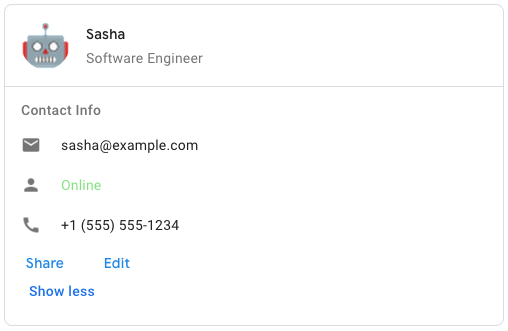 To create the sample card message in Google Chat, use the following JSON: ``` { \"cardsV2\": [ { \"cardId\": \"unique-card-id\", \"card\": { \"header\": { \"title\": \"Sasha\", \"subtitle\": \"Software Engineer\", \"imageUrl\": \"https://developers.google.com/workspace/chat/images/quickstart-app-avatar.png\", \"imageType\": \"CIRCLE\", \"imageAltText\": \"Avatar for Sasha\" }, \"sections\": [ { \"header\": \"Contact Info\", \"collapsible\": true, \"uncollapsibleWidgetsCount\": 1, \"widgets\": [ { \"decoratedText\": { \"startIcon\": { \"knownIcon\": \"EMAIL\" }, \"text\": \"sasha@example.com\" } }, { \"decoratedText\": { \"startIcon\": { \"knownIcon\": \"PERSON\" }, \"text\": \"Online\" } }, { \"decoratedText\": { \"startIcon\": { \"knownIcon\": \"PHONE\" }, \"text\": \"+1 (555) 555-1234\" } }, { \"buttonList\": { \"buttons\": [ { \"text\": \"Share\", \"onClick\": { \"openLink\": { \"url\": \"https://example.com/share\" } } }, { \"text\": \"Edit\", \"onClick\": { \"action\": { \"function\": \"goToView\", \"parameters\": [ { \"key\": \"viewType\", \"value\": \"EDIT\" } ] } } } ] } } ] } ] } } ] } ```"
}
}
},
"description": "Optional. An array of [cards](https://developers.google.com/workspace/chat/api/reference/rest/v1/cards). Chat apps can create cards with [app authentication](https://developers.google.com/workspace/chat/authenticate-authorize-chat-app). As part of the [Developer Preview Program](https://developers.google.com/workspace/preview), if your Chat app [authenticates as a user](https://developers.google.com/workspace/chat/authenticate-authorize-chat-user), it can create card messages. If your Chat app is not part of Developer Preview Program, it can't create cards with user authentication. To learn how to create a message that contains cards, see [Send a message](https://developers.google.com/workspace/chat/create-messages). [Card builder](https://addons.gsuite.google.com/uikit/builder)"
},
"clientAssignedMessageId": {
"type": "string",
"description": "Optional. A custom ID for the message. You can use field to identify a message, or to get, delete, or update a message. To set a custom ID, specify the [`messageId`](https://developers.google.com/workspace/chat/api/reference/rest/v1/spaces.messages/create#body.QUERY_PARAMETERS.message_id) field when you create the message. For details, see [Name a message](https://developers.google.com/workspace/chat/create-messages#name_a_created_message)."
},
"createTime": {
"type": "string",
"description": "Optional. Immutable. For spaces created in Chat, the time at which the message was created. This field is output only, except when used in import mode spaces. For import mode spaces, set this field to the historical timestamp at which the message was created in the source in order to preserve the original creation time."
},
"deleteTime": {
"type": "string",
"description": "Output only. The time at which the message was deleted in Google Chat. If the message is never deleted, this field is empty."
},
"deletionMetadata": {
"type": "object",
"description": "Information about a deleted message. A message is deleted when `delete_time` is set.",
"properties": {
"deletionType": {
"type": "string",
"description": "Indicates who deleted the message.",
"enum": [
"DELETION_TYPE_UNSPECIFIED",
"CREATOR",
"SPACE_OWNER",
"ADMIN",
"APP_MESSAGE_EXPIRY",
"CREATOR_VIA_APP",
"SPACE_OWNER_VIA_APP",
"SPACE_MEMBER"
]
}
}
},
"emojiReactionSummaries": {
"type": "array",
"items": {
"type": "object",
"properties": {
"emoji": {
"type": "object",
"description": "An emoji that is used as a reaction to a message."
},
"reactionCount": {
"type": "integer",
"format": "int32",
"description": "Output only. The total number of reactions using the associated emoji."
}
}
},
"description": "Output only. The list of emoji reaction summaries on the message."
},
"fallbackText": {
"type": "string",
"description": "Optional. A plain-text description of the message's cards, used when the actual cards can't be displayed—for example, mobile notifications."
},
"formattedText": {
"type": "string",
"description": "Output only. Contains the message `text` with markups added to communicate formatting. This field might not capture all formatting visible in the UI, but includes the following: * [Markup syntax](https://developers.google.com/workspace/chat/format-messages) for bold, italic, strikethrough, monospace, monospace block, bulleted list, and block quote. * [User mentions](https://developers.google.com/workspace/chat/format-messages#messages-@mention) using the format ``. * Custom hyperlinks using the format `<{url}|{rendered_text}>` where the first string is the URL and the second is the rendered text—for example, ``. * Custom emoji using the format `:{emoji_name}:`—for example, `:smile:`. This doesn't apply to Unicode emoji, such as `U+1F600` for a grinning face emoji. * Bullet list items using asterisks (`*`)—for example, `* item`. For more information, see [View text formatting sent in a message](https://developers.google.com/workspace/chat/format-messages#view_text_formatting_sent_in_a_message)"
},
"lastUpdateTime": {
"type": "string",
"description": "Output only. The time at which the message was last edited by a user. If the message has never been edited, this field is empty."
},
"matchedUrl": {
"type": "object",
"description": "A matched URL in a Chat message. Chat apps can preview matched URLs. For more information, see [Preview links](https://developers.google.com/chat/how-tos/preview-links).",
"properties": {
"url": {
"type": "string",
"description": "Output only. The URL that was matched."
}
}
},
"name": {
"type": "string",
"description": "Identifier. Resource name of the message. Format: `spaces/{space}/messages/{message}` Where `{space}` is the ID of the space where the message is posted and `{message}` is a system-assigned ID for the message. For example, `spaces/AAAAAAAAAAA/messages/BBBBBBBBBBB.BBBBBBBBBBB`. If you set a custom ID when you create a message, you can use this ID to specify the message in a request by replacing `{message}` with the value from the `clientAssignedMessageId` field. For example, `spaces/AAAAAAAAAAA/messages/client-custom-name`. For details, see [Name a message](https://developers.google.com/workspace/chat/create-messages#name_a_created_message)."
},
"privateMessageViewer": {
"type": "object",
"description": "A user in Google Chat. When returned as an output from a request, if your Chat app [authenticates as a user](https://developers.google.com/workspace/chat/authenticate-authorize-chat-user), the output for a `User` resource only populates the user's `name` and `type`.",
"properties": {
"domainId": {
"type": "string",
"description": "Unique identifier of the user's Google Workspace domain."
},
"isAnonymous": {
"type": "boolean",
"description": "Output only. When `true`, the user is deleted or their profile is not visible."
},
"type": {
"type": "string",
"description": "User type.",
"enum": [
"TYPE_UNSPECIFIED",
"HUMAN",
"BOT"
]
},
"name": {
"type": "string",
"description": "Resource name for a Google Chat user. Format: `users/{user}`. `users/app` can be used as an alias for the calling app bot user. For human users, `{user}` is the same user identifier as: - the `id` for the [Person](https://developers.google.com/people/api/rest/v1/people) in the People API. For example, `users/123456789` in Chat API represents the same person as the `123456789` Person profile ID in People API. - the `id` for a [user](https://developers.google.com/admin-sdk/directory/reference/rest/v1/users) in the Admin SDK Directory API. - the user's email address can be used as an alias for `{user}` in API requests. For example, if the People API Person profile ID for `user@example.com` is `123456789`, you can use `users/user@example.com` as an alias to reference `users/123456789`. Only the canonical resource name (for example `users/123456789`) will be returned from the API."
},
"displayName": {
"type": "string",
"description": "Output only. The user's display name."
}
}
},
"quotedMessageMetadata": {
"type": "object",
"description": "Information about a message that another message quotes. When you update a message, you can't add or replace the `quotedMessageMetadata` field, but you can remove it. For example usage, see [Quote another message](https://developers.google.com/workspace/chat/create-messages#quote-a-message).",
"properties": {
"quotedMessageSnapshot": {
"type": "object",
"description": "Provides a snapshot of the content of the quoted message at the time of quoting or forwarding"
},
"forwardedMetadata": {
"type": "object",
"description": "Metadata about the source space from which a message was forwarded."
},
"quoteType": {
"type": "string",
"description": "Optional. Specifies the quote type. If not set, defaults to REPLY in the message read/write path for backward compatibility.",
"enum": [
"QUOTE_TYPE_UNSPECIFIED",
"REPLY",
"FORWARD"
]
},
"name": {
"type": "string",
"description": "Required. Resource name of the message that is quoted. Format: `spaces/{space}/messages/{message}`"
},
"lastUpdateTime": {
"type": "string",
"description": "Required. The timestamp when the quoted message was created or when the quoted message was last updated. If the message was edited, use this field, `last_update_time`. If the message was never edited, use `create_time`. If `last_update_time` doesn't match the latest version of the quoted message, the request fails."
}
},
"required": [
"lastUpdateTime",
"name"
]
},
"sender": {
"type": "object",
"description": "A user in Google Chat. When returned as an output from a request, if your Chat app [authenticates as a user](https://developers.google.com/workspace/chat/authenticate-authorize-chat-user), the output for a `User` resource only populates the user's `name` and `type`.",
"properties": {
"domainId": {
"type": "string",
"description": "Unique identifier of the user's Google Workspace domain."
},
"isAnonymous": {
"type": "boolean",
"description": "Output only. When `true`, the user is deleted or their profile is not visible."
},
"type": {
"type": "string",
"description": "User type.",
"enum": [
"TYPE_UNSPECIFIED",
"HUMAN",
"BOT"
]
},
"name": {
"type": "string",
"description": "Resource name for a Google Chat user. Format: `users/{user}`. `users/app` can be used as an alias for the calling app bot user. For human users, `{user}` is the same user identifier as: - the `id` for the [Person](https://developers.google.com/people/api/rest/v1/people) in the People API. For example, `users/123456789` in Chat API represents the same person as the `123456789` Person profile ID in People API. - the `id` for a [user](https://developers.google.com/admin-sdk/directory/reference/rest/v1/users) in the Admin SDK Directory API. - the user's email address can be used as an alias for `{user}` in API requests. For example, if the People API Person profile ID for `user@example.com` is `123456789`, you can use `users/user@example.com` as an alias to reference `users/123456789`. Only the canonical resource name (for example `users/123456789`) will be returned from the API."
},
"displayName": {
"type": "string",
"description": "Output only. The user's display name."
}
}
},
"silent": {
"type": "boolean",
"description": "Output only. Whether this is a silent message. Silent messages are messages where Chat suppresses push notifications for recipients."
},
"slashCommand": {
"type": "object",
"description": "Metadata about a [slash command](https://developers.google.com/workspace/chat/commands) in Google Chat.",
"properties": {
"commandId": {
"type": "string",
"description": "The ID of the slash command."
}
}
},
"space": {
"type": "object",
"description": "A space in Google Chat. Spaces are conversations between two or more users or 1:1 messages between a user and a Chat app.",
"properties": {
"singleUserBotDm": {
"type": "boolean",
"description": "Optional. Whether the space is a DM between a Chat app and a single human."
},
"type": {
"type": "string",
"description": "Output only. Deprecated: Use `space_type` instead. The type of a space.",
"enum": [
"TYPE_UNSPECIFIED",
"ROOM",
"DM"
]
},
"accessSettings": {
"type": "object",
"description": "Represents the [access setting](https://support.google.com/chat/answer/11971020) of the space."
},
"predefinedPermissionSettings": {
"type": "string",
"description": "Optional. Input only. Predefined space permission settings, input only when creating a space. If the field is not set, a collaboration space is created. After you create the space, settings are populated in the `PermissionSettings` field. Setting predefined permission settings supports: - [App authentication](https://developers.google.com/workspace/chat/authenticate-authorize-chat-app) with [administrator approval](https://support.google.com/a?p=chat-app-auth) with the `chat.app.spaces` or `chat.app.spaces.create` scopes. - [User authentication](https://developers.google.com/workspace/chat/authenticate-authorize-chat-user)",
"enum": [
"PREDEFINED_PERMISSION_SETTINGS_UNSPECIFIED",
"COLLABORATION_SPACE",
"ANNOUNCEMENT_SPACE"
]
},
"adminInstalled": {
"type": "boolean",
"description": "Output only. For direct message (DM) spaces with a Chat app, whether the space was created by a Google Workspace administrator. Administrators can install and set up a direct message with a Chat app on behalf of users in their organization. To support admin install, your Chat app must feature direct messaging."
},
"spaceThreadingState": {
"type": "string",
"description": "Output only. The threading state in the Chat space.",
"enum": [
"SPACE_THREADING_STATE_UNSPECIFIED",
"THREADED_MESSAGES",
"GROUPED_MESSAGES",
"UNTHREADED_MESSAGES"
]
},
"lastActiveTime": {
"type": "string",
"description": "Output only. Timestamp of the last message in the space."
},
"spaceUri": {
"type": "string",
"description": "Output only. The URI for a user to access the space."
},
"permissionSettings": {
"type": "object",
"description": "[Permission settings](https://support.google.com/chat/answer/13340792) that you can specify when updating an existing named space. To set permission settings when creating a space, specify the `PredefinedPermissionSettings` field in your request."
},
"importModeExpireTime": {
"type": "string",
"description": "Output only. The time when the space will be automatically deleted by the system if it remains in import mode. Each space created in import mode must exit this mode before this expire time using `spaces.completeImport`. This field is only populated for spaces that were created with import mode."
},
"displayName": {
"type": "string",
"description": "Optional. The space's display name. Required when [creating a space](https://developers.google.com/workspace/chat/api/reference/rest/v1/spaces/create) with a `spaceType` of `SPACE`. If you receive the error message `ALREADY_EXISTS` when creating a space or updating the `displayName`, try a different `displayName`. An existing space within the Google Workspace organization might already use this display name. For direct messages, this field might be empty. Supports up to 128 characters."
},
"createTime": {
"type": "string",
"description": "Optional. Immutable. For spaces created in Chat, the time the space was created. This field is output only, except when used in import mode spaces. For import mode spaces, set this field to the historical timestamp at which the space was created in the source in order to preserve the original creation time. Only populated in the output when `spaceType` is `GROUP_CHAT` or `SPACE`."
},
"customer": {
"type": "string",
"description": "Optional. Immutable. The customer id of the domain of the space. Required only when creating a space with [app authentication](https://developers.google.com/workspace/chat/authenticate-authorize-chat-app) and `SpaceType` is `SPACE`, otherwise should not be set. In the format `customers/{customer}`, where `customer` is the `id` from the [Admin SDK customer resource](https://developers.google.com/admin-sdk/directory/reference/rest/v1/customers). Private apps can also use the `customers/my_customer` alias to create the space in the same Google Workspace organization as the app. This field isn't populated for direct messages (DMs) or when the space is created by non-Google Workspace users."
},
"spaceType": {
"type": "string",
"description": "Optional. The type of space. Required when creating a space or updating the space type of a space. Output only for other usage.",
"enum": [
"SPACE_TYPE_UNSPECIFIED",
"SPACE",
"GROUP_CHAT",
"DIRECT_MESSAGE"
]
},
"importMode": {
"type": "boolean",
"description": "Optional. Whether this space is created in `Import Mode` as part of a data migration into Google Workspace. While spaces are being imported, they aren't visible to users until the import is complete. Creating a space in `Import Mode`requires [user authentication](https://developers.google.com/workspace/chat/authenticate-authorize-chat-user)."
},
"name": {
"type": "string",
"description": "Identifier. Resource name of the space. Format: `spaces/{space}` Where `{space}` represents the system-assigned ID for the space. You can obtain the space ID by calling the [`spaces.list()`](https://developers.google.com/workspace/chat/api/reference/rest/v1/spaces/list) method or from the space URL. For example, if the space URL is `https://mail.google.com/mail/u/0/#chat/space/AAAAAAAAA`, the space ID is `AAAAAAAAA`."
},
"spaceDetails": {
"type": "object",
"description": "Details about the space including description and rules."
},
"externalUserAllowed": {
"type": "boolean",
"description": "Optional. Immutable. Whether this space permits any Google Chat user as a member. Input when creating a space in a Google Workspace organization. Omit this field when creating spaces in the following conditions: * The authenticated user uses a consumer account (unmanaged user account). By default, a space created by a consumer account permits any Google Chat user. For existing spaces, this field is output only."
},
"membershipCount": {
"type": "object",
"description": "Represents the count of memberships of a space, grouped into categories."
},
"spaceHistoryState": {
"type": "string",
"description": "Optional. The message history state for messages and threads in this space.",
"enum": [
"HISTORY_STATE_UNSPECIFIED",
"HISTORY_OFF",
"HISTORY_ON"
]
},
"threaded": {
"type": "boolean",
"description": "Output only. Deprecated: Use `spaceThreadingState` instead. Whether messages are threaded in this space."
}
}
},
"text": {
"type": "string",
"description": "Optional. Plain-text body of the message. The first link to an image, video, or web page generates a [preview chip](https://developers.google.com/workspace/chat/preview-links). You can also [@mention a Google Chat user](https://developers.google.com/workspace/chat/format-messages#messages-@mention), or everyone in the space. To learn about creating text messages, see [Send a message](https://developers.google.com/workspace/chat/create-messages)."
},
"thread": {
"type": "object",
"description": "A thread in a Google Chat space. For example usage, see [Start or reply to a message thread](https://developers.google.com/workspace/chat/create-messages#create-message-thread). If you specify a thread when creating a message, you can set the [`messageReplyOption`](https://developers.google.com/workspace/chat/api/reference/rest/v1/spaces.messages/create#messagereplyoption) field to determine what happens if no matching thread is found.",
"properties": {
"name": {
"type": "string",
"description": "Identifier. Resource name of the thread. Example: `spaces/{space}/threads/{thread}`"
},
"threadKey": {
"type": "string",
"description": "Optional. Input for creating or updating a thread. Otherwise, output only. ID for the thread. Supports up to 4000 characters. This ID is unique to the Chat app that sets it. For example, if multiple Chat apps create a message using the same thread key, the messages are posted in different threads. To reply in a thread created by a person or another Chat app, specify the thread `name` field instead."
}
}
},
"threadReply": {
"type": "boolean",
"description": "Output only. When `true`, the message is a response in a reply thread. When `false`, the message is visible in the space's top-level conversation as either the first message of a thread or a message with no threaded replies. If the space doesn't support reply in threads, this field is always `false`."
}
},
"required": [
"PCID",
"spacesId"
]
}
````
***
## google-chat-api-messages\_create\_reaction
Creates a reaction and adds it to a message.
**Parameters:**
| Parameter | Type | Required | Default | Description |
| ------------ | ------ | -------- | ------- | -------------------------------------------------------------------------------------------------------------------------------------------------------------------------------------------------------------------------------------------------------------------------- |
| `messagesId` | string | Yes | — | The ID of the messages. |
| `spacesId` | string | Yes | — | The ID of the spaces. |
| `emoji` | object | Yes | — | An emoji that is used as a reaction to a message. |
| `name` | string | No | — | Identifier. The resource name of the reaction. Format: `spaces/{space}/messages/{message}/reactions/{reaction}` |
| `user` | object | No | — | A user in Google Chat. When returned as an output from a request, if your Chat app [authenticates as a user](https://developers.google.com/workspace/chat/authenticate-authorize-chat-user), the output for a `User` resource only populates the user's `name` and `type`. |
```json theme={null}
{
"type": "object",
"properties": {
"PCID": {
"type": "string",
"description": "Pink Connect ID for the authenticated connection"
},
"messagesId": {
"type": "string",
"description": "The ID of the messages."
},
"spacesId": {
"type": "string",
"description": "The ID of the spaces."
},
"emoji": {
"type": "object",
"description": "An emoji that is used as a reaction to a message.",
"properties": {
"unicode": {
"type": "string",
"description": "Optional. A basic emoji represented by a unicode string."
},
"customEmoji": {
"type": "object",
"description": "Represents a [custom emoji](https://support.google.com/chat/answer/12800149)."
}
}
},
"name": {
"type": "string",
"description": "Identifier. The resource name of the reaction. Format: `spaces/{space}/messages/{message}/reactions/{reaction}`"
},
"user": {
"type": "object",
"description": "A user in Google Chat. When returned as an output from a request, if your Chat app [authenticates as a user](https://developers.google.com/workspace/chat/authenticate-authorize-chat-user), the output for a `User` resource only populates the user's `name` and `type`.",
"properties": {
"domainId": {
"type": "string",
"description": "Unique identifier of the user's Google Workspace domain."
},
"isAnonymous": {
"type": "boolean",
"description": "Output only. When `true`, the user is deleted or their profile is not visible."
},
"type": {
"type": "string",
"description": "User type.",
"enum": [
"TYPE_UNSPECIFIED",
"HUMAN",
"BOT"
]
},
"name": {
"type": "string",
"description": "Resource name for a Google Chat user. Format: `users/{user}`. `users/app` can be used as an alias for the calling app bot user. For human users, `{user}` is the same user identifier as: - the `id` for the [Person](https://developers.google.com/people/api/rest/v1/people) in the People API. For example, `users/123456789` in Chat API represents the same person as the `123456789` Person profile ID in People API. - the `id` for a [user](https://developers.google.com/admin-sdk/directory/reference/rest/v1/users) in the Admin SDK Directory API. - the user's email address can be used as an alias for `{user}` in API requests. For example, if the People API Person profile ID for `user@example.com` is `123456789`, you can use `users/user@example.com` as an alias to reference `users/123456789`. Only the canonical resource name (for example `users/123456789`) will be returned from the API."
},
"displayName": {
"type": "string",
"description": "Output only. The user's display name."
}
}
}
},
"required": [
"PCID",
"messagesId",
"spacesId",
"emoji"
]
}
```
***
## google-chat-api-messages\_delete\_message
Deletes a message.
**Parameters:**
| Parameter | Type | Required | Default | Description |
| ------------ | ------- | -------- | ------- | --------------------------------------------------------------------------------------------------------------------------------------------------------------------------------------------------------------------------------------------------------------------------------------------------------------------------------------------------------------------------------------------------------------------------------------------------------------------------------------------- |
| `force` | boolean | No | — | Optional. When `true`, deleting a message also deletes its threaded replies. When `false`, if a message has threaded replies, deletion fails. Only applies when [authenticating as a user](https://developers.google.com/workspace/chat/authenticate-authorize-chat-user). Has no effect when \[authenticating as a Chat app] ([https://developers.google.com/workspace/chat/authenticate-authorize-chat-app](https://developers.google.com/workspace/chat/authenticate-authorize-chat-app)). |
| `messagesId` | string | Yes | — | The ID of the messages. |
| `spacesId` | string | Yes | — | The ID of the spaces. |
```json theme={null}
{
"type": "object",
"properties": {
"PCID": {
"type": "string",
"description": "Pink Connect ID for the authenticated connection"
},
"force": {
"type": "boolean",
"description": "Optional. When `true`, deleting a message also deletes its threaded replies. When `false`, if a message has threaded replies, deletion fails. Only applies when [authenticating as a user](https://developers.google.com/workspace/chat/authenticate-authorize-chat-user). Has no effect when [authenticating as a Chat app] (https://developers.google.com/workspace/chat/authenticate-authorize-chat-app)."
},
"messagesId": {
"type": "string",
"description": "The ID of the messages."
},
"spacesId": {
"type": "string",
"description": "The ID of the spaces."
}
},
"required": [
"PCID",
"messagesId",
"spacesId"
]
}
```
***
## google-chat-api-messages\_delete\_reaction
Deletes a reaction to a message.
**Parameters:**
| Parameter | Type | Required | Default | Description |
| ------------- | ------ | -------- | ------- | ------------------------ |
| `messagesId` | string | Yes | — | The ID of the messages. |
| `reactionsId` | string | Yes | — | The ID of the reactions. |
| `spacesId` | string | Yes | — | The ID of the spaces. |
```json theme={null}
{
"type": "object",
"properties": {
"PCID": {
"type": "string",
"description": "Pink Connect ID for the authenticated connection"
},
"messagesId": {
"type": "string",
"description": "The ID of the messages."
},
"reactionsId": {
"type": "string",
"description": "The ID of the reactions."
},
"spacesId": {
"type": "string",
"description": "The ID of the spaces."
}
},
"required": [
"PCID",
"messagesId",
"reactionsId",
"spacesId"
]
}
```
***
## google-chat-api-messages\_get\_attachment
Gets the metadata of a message attachment.
**Parameters:**
| Parameter | Type | Required | Default | Description |
| --------------- | ------ | -------- | ------- | -------------------------- |
| `attachmentsId` | string | Yes | — | The ID of the attachments. |
| `messagesId` | string | Yes | — | The ID of the messages. |
| `spacesId` | string | Yes | — | The ID of the spaces. |
```json theme={null}
{
"type": "object",
"properties": {
"PCID": {
"type": "string",
"description": "Pink Connect ID for the authenticated connection"
},
"attachmentsId": {
"type": "string",
"description": "The ID of the attachments."
},
"messagesId": {
"type": "string",
"description": "The ID of the messages."
},
"spacesId": {
"type": "string",
"description": "The ID of the spaces."
}
},
"required": [
"PCID",
"attachmentsId",
"messagesId",
"spacesId"
]
}
```
***
## google-chat-api-messages\_get\_message
Returns details about a message.
**Parameters:**
| Parameter | Type | Required | Default | Description |
| ------------ | ------ | -------- | ------- | ----------------------- |
| `messagesId` | string | Yes | — | The ID of the messages. |
| `spacesId` | string | Yes | — | The ID of the spaces. |
```json theme={null}
{
"type": "object",
"properties": {
"PCID": {
"type": "string",
"description": "Pink Connect ID for the authenticated connection"
},
"messagesId": {
"type": "string",
"description": "The ID of the messages."
},
"spacesId": {
"type": "string",
"description": "The ID of the spaces."
}
},
"required": [
"PCID",
"messagesId",
"spacesId"
]
}
```
***
## google-chat-api-messages\_list\_messages
Lists messages in a space that the caller is a member of, including messages from blocked members and spaces.
**Parameters:**
| Parameter | Type | Required | Default | Description |
| ------------- | ------- | -------- | ------- | ----------------------------------------------------------------------------------------------------------------------------------------------------------------------------------------------------------------------------------------------------------------------------------------------------------------------------------------------------------------------------------------------------------------------------------------------------------------------------------------------------------------------------------------------------------------------------------------------------------------------------------------------------------------------------------------------------------------------------------------------------------------------------------------------------------------------------------------------------------------------------------------------------------------------------------------------------------------------------------------------------------------------------------------------------------------------------------------------------------------------------------------------------------------------------------------------------------------------------------------------------------------------------------------------------------------------------------------------- |
| `filter` | string | No | — | Optional. A query filter. You can filter messages by date (`create_time`) and thread (`thread.name`). To filter messages by the date they were created, specify the `create_time` with a timestamp in [RFC-3339](https://www.rfc-editor.org/rfc/rfc3339) format and double quotation marks. For example, `"2023-04-21T11:30:00-04:00"`. You can use the greater than operator `>` to list messages that were created after a timestamp, or the less than operator `<` to list messages that were created before a timestamp. To filter messages within a time interval, use the `AND` operator between two timestamps. To filter by thread, specify the `thread.name`, formatted as `spaces/{space}/threads/{thread}`. You can only specify one `thread.name` per query. To filter by both thread and date, use the `AND` operator in your query. For example, the following queries are valid: `create_time > "2012-04-21T11:30:00-04:00" create_time > "2012-04-21T11:30:00-04:00" AND thread.name = spaces/AAAAAAAAAAA/threads/123 create_time > "2012-04-21T11:30:00+00:00" AND create_time < "2013-01-01T00:00:00+00:00" AND thread.name = spaces/AAAAAAAAAAA/threads/123 thread.name = spaces/AAAAAAAAAAA/threads/123` Invalid queries are rejected by the server with an `INVALID_ARGUMENT` error. |
| `pageSize` | integer | No | — | Optional. The maximum number of messages returned. The service might return fewer messages than this value. If unspecified, at most 25 are returned. The maximum value is 1000. If you use a value more than 1000, it's automatically changed to 1000. Negative values return an `INVALID_ARGUMENT` error. |
| `orderBy` | string | No | — | Optional. How the list of messages is ordered. Specify a value to order by an ordering operation. Valid ordering operation values are as follows: - `ASC` for ascending. - `DESC` for descending. The default ordering is `create_time ASC`. |
| `showDeleted` | boolean | No | — | Optional. Whether to include deleted messages. Deleted messages include deleted time and metadata about their deletion, but message content is unavailable. |
| `pageToken` | string | No | — | Optional. A page token received from a previous list messages call. Provide this parameter to retrieve the subsequent page. When paginating, all other parameters provided should match the call that provided the page token. Passing different values to the other parameters might lead to unexpected results. |
| `spacesId` | string | Yes | — | The ID of the spaces. |
````json theme={null}
{
"type": "object",
"properties": {
"PCID": {
"type": "string",
"description": "Pink Connect ID for the authenticated connection"
},
"filter": {
"type": "string",
"description": "Optional. A query filter. You can filter messages by date (`create_time`) and thread (`thread.name`). To filter messages by the date they were created, specify the `create_time` with a timestamp in [RFC-3339](https://www.rfc-editor.org/rfc/rfc3339) format and double quotation marks. For example, `\"2023-04-21T11:30:00-04:00\"`. You can use the greater than operator `>` to list messages that were created after a timestamp, or the less than operator `<` to list messages that were created before a timestamp. To filter messages within a time interval, use the `AND` operator between two timestamps. To filter by thread, specify the `thread.name`, formatted as `spaces/{space}/threads/{thread}`. You can only specify one `thread.name` per query. To filter by both thread and date, use the `AND` operator in your query. For example, the following queries are valid: ``` create_time > \"2012-04-21T11:30:00-04:00\" create_time > \"2012-04-21T11:30:00-04:00\" AND thread.name = spaces/AAAAAAAAAAA/threads/123 create_time > \"2012-04-21T11:30:00+00:00\" AND create_time < \"2013-01-01T00:00:00+00:00\" AND thread.name = spaces/AAAAAAAAAAA/threads/123 thread.name = spaces/AAAAAAAAAAA/threads/123 ``` Invalid queries are rejected by the server with an `INVALID_ARGUMENT` error."
},
"pageSize": {
"type": "integer",
"description": "Optional. The maximum number of messages returned. The service might return fewer messages than this value. If unspecified, at most 25 are returned. The maximum value is 1000. If you use a value more than 1000, it's automatically changed to 1000. Negative values return an `INVALID_ARGUMENT` error."
},
"orderBy": {
"type": "string",
"description": "Optional. How the list of messages is ordered. Specify a value to order by an ordering operation. Valid ordering operation values are as follows: - `ASC` for ascending. - `DESC` for descending. The default ordering is `create_time ASC`."
},
"showDeleted": {
"type": "boolean",
"description": "Optional. Whether to include deleted messages. Deleted messages include deleted time and metadata about their deletion, but message content is unavailable."
},
"pageToken": {
"type": "string",
"description": "Optional. A page token received from a previous list messages call. Provide this parameter to retrieve the subsequent page. When paginating, all other parameters provided should match the call that provided the page token. Passing different values to the other parameters might lead to unexpected results."
},
"spacesId": {
"type": "string",
"description": "The ID of the spaces."
}
},
"required": [
"PCID",
"spacesId"
]
}
````
***
## google-chat-api-messages\_list\_reactions
Lists reactions to a message.
**Parameters:**
| Parameter | Type | Required | Default | Description |
| ------------ | ------- | -------- | ------- | ---------------------------------------------------------------------------------------------------------------------------------------------------------------------------------------------------------------------------------------------------------------------------------------------------------------------------------------------------------------------------------------------------------------------------------------------------------------------------------------------------------------------------------------------------------------------------------------------------------------------------------------------------------------------------------------------------------------------------------------------------------------------------------------------------------------------------------------------------------------------------------------------------------------------------------------------------------------------------------------------------------------------------------------------------------------------------------------------------------------------------------------------------------------------------------------------------------------------------------------------------------------------------------------------------------------------------------------------------------------------------------------------------------------------------------------------------------------------------------------------------------------------------------------------------------------------------------------------------------------------------------------------------------------------------------- |
| `pageSize` | integer | No | — | Optional. The maximum number of reactions returned. The service can return fewer reactions than this value. If unspecified, the default value is 25. The maximum value is 200; values above 200 are changed to 200. |
| `filter` | string | No | — | Optional. A query filter. You can filter reactions by [emoji](https://developers.google.com/workspace/chat/api/reference/rest/v1/Emoji) (either `emoji.unicode` or `emoji.custom_emoji.uid`) and [user](https://developers.google.com/workspace/chat/api/reference/rest/v1/User) (`user.name`). To filter reactions for multiple emojis or users, join similar fields with the `OR` operator, such as `emoji.unicode = "🙂" OR emoji.unicode = "👍"` and `user.name = "users/AAAAAA" OR user.name = "users/BBBBBB"`. To filter reactions by emoji and user, use the `AND` operator, such as `emoji.unicode = "🙂" AND user.name = "users/AAAAAA"`. If your query uses both `AND` and `OR`, group them with parentheses. For example, the following queries are valid: `user.name = "users/{user}" emoji.unicode = "🙂" emoji.custom_emoji.uid = "{uid}" emoji.unicode = "🙂" OR emoji.unicode = "👍" emoji.unicode = "🙂" OR emoji.custom_emoji.uid = "{uid}" emoji.unicode = "🙂" AND user.name = "users/{user}" (emoji.unicode = "🙂" OR emoji.custom_emoji.uid = "{uid}") AND user.name = "users/{user}"` The following queries are invalid: `emoji.unicode = "🙂" AND emoji.unicode = "👍" emoji.unicode = "🙂" AND emoji.custom_emoji.uid = "{uid}" emoji.unicode = "🙂" OR user.name = "users/{user}" emoji.unicode = "🙂" OR emoji.custom_emoji.uid = "{uid}" OR user.name = "users/{user}" emoji.unicode = "🙂" OR emoji.custom_emoji.uid = "{uid}" AND user.name = "users/{user}"` Invalid queries are rejected with an `INVALID_ARGUMENT` error. |
| `pageToken` | string | No | — | Optional. (If resuming from a previous query.) A page token received from a previous list reactions call. Provide this to retrieve the subsequent page. When paginating, the filter value should match the call that provided the page token. Passing a different value might lead to unexpected results. |
| `messagesId` | string | Yes | — | The ID of the messages. |
| `spacesId` | string | Yes | — | The ID of the spaces. |
````json theme={null}
{
"type": "object",
"properties": {
"PCID": {
"type": "string",
"description": "Pink Connect ID for the authenticated connection"
},
"pageSize": {
"type": "integer",
"description": "Optional. The maximum number of reactions returned. The service can return fewer reactions than this value. If unspecified, the default value is 25. The maximum value is 200; values above 200 are changed to 200."
},
"filter": {
"type": "string",
"description": "Optional. A query filter. You can filter reactions by [emoji](https://developers.google.com/workspace/chat/api/reference/rest/v1/Emoji) (either `emoji.unicode` or `emoji.custom_emoji.uid`) and [user](https://developers.google.com/workspace/chat/api/reference/rest/v1/User) (`user.name`). To filter reactions for multiple emojis or users, join similar fields with the `OR` operator, such as `emoji.unicode = \"🙂\" OR emoji.unicode = \"👍\"` and `user.name = \"users/AAAAAA\" OR user.name = \"users/BBBBBB\"`. To filter reactions by emoji and user, use the `AND` operator, such as `emoji.unicode = \"🙂\" AND user.name = \"users/AAAAAA\"`. If your query uses both `AND` and `OR`, group them with parentheses. For example, the following queries are valid: ``` user.name = \"users/{user}\" emoji.unicode = \"🙂\" emoji.custom_emoji.uid = \"{uid}\" emoji.unicode = \"🙂\" OR emoji.unicode = \"👍\" emoji.unicode = \"🙂\" OR emoji.custom_emoji.uid = \"{uid}\" emoji.unicode = \"🙂\" AND user.name = \"users/{user}\" (emoji.unicode = \"🙂\" OR emoji.custom_emoji.uid = \"{uid}\") AND user.name = \"users/{user}\" ``` The following queries are invalid: ``` emoji.unicode = \"🙂\" AND emoji.unicode = \"👍\" emoji.unicode = \"🙂\" AND emoji.custom_emoji.uid = \"{uid}\" emoji.unicode = \"🙂\" OR user.name = \"users/{user}\" emoji.unicode = \"🙂\" OR emoji.custom_emoji.uid = \"{uid}\" OR user.name = \"users/{user}\" emoji.unicode = \"🙂\" OR emoji.custom_emoji.uid = \"{uid}\" AND user.name = \"users/{user}\" ``` Invalid queries are rejected with an `INVALID_ARGUMENT` error."
},
"pageToken": {
"type": "string",
"description": "Optional. (If resuming from a previous query.) A page token received from a previous list reactions call. Provide this to retrieve the subsequent page. When paginating, the filter value should match the call that provided the page token. Passing a different value might lead to unexpected results."
},
"messagesId": {
"type": "string",
"description": "The ID of the messages."
},
"spacesId": {
"type": "string",
"description": "The ID of the spaces."
}
},
"required": [
"PCID",
"messagesId",
"spacesId"
]
}
````
***
## google-chat-api-messages\_update\_message
Updates a message.
**Parameters:**
| Parameter | Type | Required | Default | Description |
| ------------------------- | --------- | -------- | ------- | ---------------------------------------------------------------------------------------------------------------------------------------------------------------------------------------------------------------------------------------------------------------------------------------------------------------------------------------------------------------------------------------------------------------------------------------------------------------------------------------------------------------------------------------------------------------------------------------------------------------------------------------------------------------------------------------------------------------------------------------------------------------------------------------------------------------------------------------------------------------------------------------------------------------------------------------------------------------------------------------------------------------------------------------------------------------------------------------- |
| `updateMask` | string | Yes | — | Required. The field paths to update. Separate multiple values with commas or use `*` to update all field paths. Currently supported field paths: - `text` - `attachment` - `cards` (Requires app authentication.) - `cards_v2` (Requires app authentication.) - `accessory_widgets` (Requires app authentication.) - `quoted_message_metadata` (Only allows removal of the quoted message.) |
| `allowMissing` | boolean | No | — | Optional. If `true` and the message isn't found, a new message is created and `updateMask` is ignored. The specified message ID must be [client-assigned](https://developers.google.com/workspace/chat/create-messages#name_a_created_message) or the request fails. |
| `messagesId` | string | Yes | — | The ID of the messages. |
| `spacesId` | string | Yes | — | The ID of the spaces. |
| `accessoryWidgets` | object\[] | No | — | Optional. One or more interactive widgets that appear at the bottom of a message. You can add accessory widgets to messages that contain text, cards, or both text and cards. Not supported for messages that contain dialogs. For details, see [Add interactive widgets at the bottom of a message](https://developers.google.com/workspace/chat/create-messages#add-accessory-widgets). Creating a message with accessory widgets requires \[app authentication] ([https://developers.google.com/workspace/chat/authenticate-authorize-chat-app](https://developers.google.com/workspace/chat/authenticate-authorize-chat-app)). |
| `actionResponse` | object | No | — | Parameters that a Chat app can use to configure how its response is posted. |
| `annotations` | object\[] | No | — | Output only. Annotations can be associated with the plain-text body of the message or with chips that link to Google Workspace resources like Google Docs or Sheets with `start_index` and `length` of 0. |
| `argumentText` | string | No | — | Output only. Plain-text body of the message with all Chat app mentions stripped out. |
| `attachedGifs` | object\[] | No | — | Output only. GIF images that are attached to the message. |
| `attachment` | object\[] | No | — | Optional. User-uploaded attachment. |
| `cards` | object\[] | No | — | Deprecated: Use `cards_v2` instead. Rich, formatted, and interactive cards that you can use to display UI elements such as: formatted texts, buttons, and clickable images. Cards are normally displayed below the plain-text body of the message. `cards` and `cards_v2` can have a maximum size of 32 KB. |
| `cardsV2` | object\[] | No | — | Optional. An array of [cards](https://developers.google.com/workspace/chat/api/reference/rest/v1/cards). Chat apps can create cards with [app authentication](https://developers.google.com/workspace/chat/authenticate-authorize-chat-app). As part of the [Developer Preview Program](https://developers.google.com/workspace/preview), if your Chat app [authenticates as a user](https://developers.google.com/workspace/chat/authenticate-authorize-chat-user), it can create card messages. If your Chat app is not part of Developer Preview Program, it can't create cards with user authentication. To learn how to create a message that contains cards, see [Send a message](https://developers.google.com/workspace/chat/create-messages). [Card builder](https://addons.gsuite.google.com/uikit/builder) |
| `clientAssignedMessageId` | string | No | — | Optional. A custom ID for the message. You can use field to identify a message, or to get, delete, or update a message. To set a custom ID, specify the [`messageId`](https://developers.google.com/workspace/chat/api/reference/rest/v1/spaces.messages/create#body.QUERY_PARAMETERS.message_id) field when you create the message. For details, see [Name a message](https://developers.google.com/workspace/chat/create-messages#name_a_created_message). |
| `createTime` | string | No | — | Optional. Immutable. For spaces created in Chat, the time at which the message was created. This field is output only, except when used in import mode spaces. For import mode spaces, set this field to the historical timestamp at which the message was created in the source in order to preserve the original creation time. |
| `deleteTime` | string | No | — | Output only. The time at which the message was deleted in Google Chat. If the message is never deleted, this field is empty. |
| `deletionMetadata` | object | No | — | Information about a deleted message. A message is deleted when `delete_time` is set. |
| `emojiReactionSummaries` | object\[] | No | — | Output only. The list of emoji reaction summaries on the message. |
| `fallbackText` | string | No | — | Optional. A plain-text description of the message's cards, used when the actual cards can't be displayed—for example, mobile notifications. |
| `formattedText` | string | No | — | Output only. Contains the message `text` with markups added to communicate formatting. This field might not capture all formatting visible in the UI, but includes the following: \* [Markup syntax](https://developers.google.com/workspace/chat/format-messages) for bold, italic, strikethrough, monospace, monospace block, bulleted list, and block quote. \* [User mentions](https://developers.google.com/workspace/chat/format-messages#messages-@mention) using the format ``. * Custom hyperlinks using the format `<{url}\|{rendered_text}>` where the first string is the URL and the second is the rendered text—for example, ``. \* Custom emoji using the format `:{emoji_name}:`—for example, `:smile:`. This doesn't apply to Unicode emoji, such as `U+1F600` for a grinning face emoji. \* Bullet list items using asterisks (`*`)—for example, `* item`. For more information, see [View text formatting sent in a message](https://developers.google.com/workspace/chat/format-messages#view_text_formatting_sent_in_a_message) |
| `lastUpdateTime` | string | No | — | Output only. The time at which the message was last edited by a user. If the message has never been edited, this field is empty. |
| `matchedUrl` | object | No | — | A matched URL in a Chat message. Chat apps can preview matched URLs. For more information, see [Preview links](https://developers.google.com/chat/how-tos/preview-links). |
| `name` | string | No | — | Identifier. Resource name of the message. Format: `spaces/{space}/messages/{message}` Where `{space}` is the ID of the space where the message is posted and `{message}` is a system-assigned ID for the message. For example, `spaces/AAAAAAAAAAA/messages/BBBBBBBBBBB.BBBBBBBBBBB`. If you set a custom ID when you create a message, you can use this ID to specify the message in a request by replacing `{message}` with the value from the `clientAssignedMessageId` field. For example, `spaces/AAAAAAAAAAA/messages/client-custom-name`. For details, see [Name a message](https://developers.google.com/workspace/chat/create-messages#name_a_created_message). |
| `privateMessageViewer` | object | No | — | A user in Google Chat. When returned as an output from a request, if your Chat app [authenticates as a user](https://developers.google.com/workspace/chat/authenticate-authorize-chat-user), the output for a `User` resource only populates the user's `name` and `type`. |
| `quotedMessageMetadata` | object | No | — | Information about a message that another message quotes. When you update a message, you can't add or replace the `quotedMessageMetadata` field, but you can remove it. For example usage, see [Quote another message](https://developers.google.com/workspace/chat/create-messages#quote-a-message). |
| `sender` | object | No | — | A user in Google Chat. When returned as an output from a request, if your Chat app [authenticates as a user](https://developers.google.com/workspace/chat/authenticate-authorize-chat-user), the output for a `User` resource only populates the user's `name` and `type`. |
| `silent` | boolean | No | — | Output only. Whether this is a silent message. Silent messages are messages where Chat suppresses push notifications for recipients. |
| `slashCommand` | object | No | — | Metadata about a [slash command](https://developers.google.com/workspace/chat/commands) in Google Chat. |
| `space` | object | No | — | A space in Google Chat. Spaces are conversations between two or more users or 1:1 messages between a user and a Chat app. |
| `text` | string | No | — | Optional. Plain-text body of the message. The first link to an image, video, or web page generates a [preview chip](https://developers.google.com/workspace/chat/preview-links). You can also [@mention a Google Chat user](https://developers.google.com/workspace/chat/format-messages#messages-@mention), or everyone in the space. To learn about creating text messages, see [Send a message](https://developers.google.com/workspace/chat/create-messages). |
| `thread` | object | No | — | A thread in a Google Chat space. For example usage, see [Start or reply to a message thread](https://developers.google.com/workspace/chat/create-messages#create-message-thread). If you specify a thread when creating a message, you can set the [`messageReplyOption`](https://developers.google.com/workspace/chat/api/reference/rest/v1/spaces.messages/create#messagereplyoption) field to determine what happens if no matching thread is found. |
| `threadReply` | boolean | No | — | Output only. When `true`, the message is a response in a reply thread. When `false`, the message is visible in the space's top-level conversation as either the first message of a thread or a message with no threaded replies. If the space doesn't support reply in threads, this field is always `false`. |
````json theme={null}
{
"type": "object",
"properties": {
"PCID": {
"type": "string",
"description": "Pink Connect ID for the authenticated connection"
},
"updateMask": {
"type": "string",
"description": "Required. The field paths to update. Separate multiple values with commas or use `*` to update all field paths. Currently supported field paths: - `text` - `attachment` - `cards` (Requires [app authentication](/chat/api/guides/auth/service-accounts).) - `cards_v2` (Requires [app authentication](/chat/api/guides/auth/service-accounts).) - `accessory_widgets` (Requires [app authentication](/chat/api/guides/auth/service-accounts).) - `quoted_message_metadata` (Only allows removal of the quoted message.)"
},
"allowMissing": {
"type": "boolean",
"description": "Optional. If `true` and the message isn't found, a new message is created and `updateMask` is ignored. The specified message ID must be [client-assigned](https://developers.google.com/workspace/chat/create-messages#name_a_created_message) or the request fails."
},
"messagesId": {
"type": "string",
"description": "The ID of the messages."
},
"spacesId": {
"type": "string",
"description": "The ID of the spaces."
},
"accessoryWidgets": {
"type": "array",
"items": {
"type": "object",
"properties": {
"buttonList": {
"type": "object",
"description": "A list of buttons layed out horizontally. For an example in Google Chat apps, see [Add a button](https://developers.google.com/workspace/chat/design-interactive-card-dialog#add_a_button). [Google Workspace add-ons and Chat apps](https://developers.google.com/workspace/extend):"
}
}
},
"description": "Optional. One or more interactive widgets that appear at the bottom of a message. You can add accessory widgets to messages that contain text, cards, or both text and cards. Not supported for messages that contain dialogs. For details, see [Add interactive widgets at the bottom of a message](https://developers.google.com/workspace/chat/create-messages#add-accessory-widgets). Creating a message with accessory widgets requires [app authentication] (https://developers.google.com/workspace/chat/authenticate-authorize-chat-app)."
},
"actionResponse": {
"type": "object",
"description": "Parameters that a Chat app can use to configure how its response is posted.",
"properties": {
"dialogAction": {
"type": "object",
"description": "Contains a [dialog](https://developers.google.com/workspace/chat/dialogs) and request status code."
},
"type": {
"type": "string",
"description": "Input only. The type of Chat app response.",
"enum": [
"TYPE_UNSPECIFIED",
"NEW_MESSAGE",
"UPDATE_MESSAGE",
"UPDATE_USER_MESSAGE_CARDS",
"REQUEST_CONFIG",
"DIALOG",
"UPDATE_WIDGET"
]
},
"url": {
"type": "string",
"description": "Input only. URL for users to authenticate or configure. (Only for `REQUEST_CONFIG` response types.)"
},
"updatedWidget": {
"type": "object",
"description": "For `selectionInput` widgets, returns autocomplete suggestions for a multiselect menu."
}
}
},
"annotations": {
"type": "array",
"items": {
"type": "object",
"properties": {
"length": {
"type": "integer",
"format": "int32",
"description": "Length of the substring in the plain-text message body this annotation corresponds to. If not present, indicates a length of 0."
},
"customEmojiMetadata": {
"type": "object",
"description": "Annotation metadata for custom emoji."
},
"userMention": {
"type": "object",
"description": "Annotation metadata for user mentions (@)."
},
"slashCommand": {
"type": "object",
"description": "Annotation metadata for slash commands (/)."
},
"startIndex": {
"type": "integer",
"format": "int32",
"description": "Start index (0-based, inclusive) in the plain-text message body this annotation corresponds to."
},
"type": {
"type": "string",
"enum": [
"ANNOTATION_TYPE_UNSPECIFIED",
"USER_MENTION",
"SLASH_COMMAND",
"RICH_LINK",
"CUSTOM_EMOJI"
],
"description": "The type of this annotation."
},
"richLinkMetadata": {
"type": "object",
"description": "A rich link to a resource. Rich links can be associated with the plain-text body of the message or represent chips that link to Google Workspace resources like Google Docs or Sheets with `start_index` and `length` of 0."
}
}
},
"description": "Output only. Annotations can be associated with the plain-text body of the message or with chips that link to Google Workspace resources like Google Docs or Sheets with `start_index` and `length` of 0."
},
"argumentText": {
"type": "string",
"description": "Output only. Plain-text body of the message with all Chat app mentions stripped out."
},
"attachedGifs": {
"type": "array",
"items": {
"type": "object",
"properties": {
"uri": {
"type": "string",
"description": "Output only. The URL that hosts the GIF image."
}
}
},
"description": "Output only. GIF images that are attached to the message."
},
"attachment": {
"type": "array",
"items": {
"type": "object",
"properties": {
"contentName": {
"type": "string",
"description": "Output only. The original file name for the content, not the full path."
},
"downloadUri": {
"type": "string",
"description": "Output only. The download URL which should be used to allow a human user to download the attachment. Chat apps shouldn't use this URL to download attachment content."
},
"contentType": {
"type": "string",
"description": "Output only. The content type (MIME type) of the file."
},
"source": {
"type": "string",
"enum": [
"SOURCE_UNSPECIFIED",
"DRIVE_FILE",
"UPLOADED_CONTENT"
],
"description": "Output only. The source of the attachment."
},
"driveDataRef": {
"type": "object",
"description": "A reference to the data of a drive attachment."
},
"thumbnailUri": {
"type": "string",
"description": "Output only. The thumbnail URL which should be used to preview the attachment to a human user. Chat apps shouldn't use this URL to download attachment content."
},
"name": {
"type": "string",
"description": "Identifier. Resource name of the attachment. Format: `spaces/{space}/messages/{message}/attachments/{attachment}`."
},
"attachmentDataRef": {
"type": "object",
"description": "A reference to the attachment data."
}
}
},
"description": "Optional. User-uploaded attachment."
},
"cards": {
"type": "array",
"items": {
"type": "object",
"properties": {
"name": {
"type": "string",
"description": "Name of the card."
},
"header": {
"type": "object",
"description": "The header value"
},
"sections": {
"type": "array",
"items": {
"type": "object",
"properties": {
"header": {
"type": "string",
"description": "The header of the section. Formatted text is supported. For more information about formatting text, see [Formatting text in Google Chat apps](https://developers.google.com/workspace/chat/format-messages#card-formatting) and [Formatting text in Google Workspace Add-ons](https://developers.google.com/apps-script/add-ons/concepts/widgets#text_formatting)."
},
"widgets": {
"type": "array",
"description": "A section must contain at least one widget."
}
}
},
"description": "Sections are separated by a line divider."
},
"cardActions": {
"type": "array",
"items": {
"type": "object",
"properties": {
"actionLabel": {
"type": "string",
"description": "The label used to be displayed in the action menu item."
},
"onClick": {
"type": "object",
"description": "An `onclick` action (for example, open a link)."
}
}
},
"description": "The actions of this card."
}
}
},
"description": "Deprecated: Use `cards_v2` instead. Rich, formatted, and interactive cards that you can use to display UI elements such as: formatted texts, buttons, and clickable images. Cards are normally displayed below the plain-text body of the message. `cards` and `cards_v2` can have a maximum size of 32 KB."
},
"cardsV2": {
"type": "array",
"items": {
"type": "object",
"properties": {
"cardId": {
"type": "string",
"description": "Required if the message contains multiple cards. A unique identifier for a card in a message."
},
"card": {
"type": "object",
"description": "A card interface displayed in a Google Chat message or Google Workspace add-on. Cards support a defined layout, interactive UI elements like buttons, and rich media like images. Use cards to present detailed information, gather information from users, and guide users to take a next step. [Card builder](https://addons.gsuite.google.com/uikit/builder) To learn how to build cards, see the following documentation: * For Google Chat apps, see [Design the components of a card or dialog](https://developers.google.com/workspace/chat/design-components-card-dialog). * For Google Workspace add-ons, see [Card-based interfaces](https://developers.google.com/apps-script/add-ons/concepts/cards). Note: You can add up to 100 widgets per card. If a section's widgets push the total count above 100, that entire section and all following sections are ignored. This limit applies to both card messages and dialogs in Google Chat apps, and to cards in Google Workspace add-ons. **Example: Card message for a Google Chat app**  To create the sample card message in Google Chat, use the following JSON: ``` { \"cardsV2\": [ { \"cardId\": \"unique-card-id\", \"card\": { \"header\": { \"title\": \"Sasha\", \"subtitle\": \"Software Engineer\", \"imageUrl\": \"https://developers.google.com/workspace/chat/images/quickstart-app-avatar.png\", \"imageType\": \"CIRCLE\", \"imageAltText\": \"Avatar for Sasha\" }, \"sections\": [ { \"header\": \"Contact Info\", \"collapsible\": true, \"uncollapsibleWidgetsCount\": 1, \"widgets\": [ { \"decoratedText\": { \"startIcon\": { \"knownIcon\": \"EMAIL\" }, \"text\": \"sasha@example.com\" } }, { \"decoratedText\": { \"startIcon\": { \"knownIcon\": \"PERSON\" }, \"text\": \"Online\" } }, { \"decoratedText\": { \"startIcon\": { \"knownIcon\": \"PHONE\" }, \"text\": \"+1 (555) 555-1234\" } }, { \"buttonList\": { \"buttons\": [ { \"text\": \"Share\", \"onClick\": { \"openLink\": { \"url\": \"https://example.com/share\" } } }, { \"text\": \"Edit\", \"onClick\": { \"action\": { \"function\": \"goToView\", \"parameters\": [ { \"key\": \"viewType\", \"value\": \"EDIT\" } ] } } } ] } } ] } ] } } ] } ```"
}
}
},
"description": "Optional. An array of [cards](https://developers.google.com/workspace/chat/api/reference/rest/v1/cards). Chat apps can create cards with [app authentication](https://developers.google.com/workspace/chat/authenticate-authorize-chat-app). As part of the [Developer Preview Program](https://developers.google.com/workspace/preview), if your Chat app [authenticates as a user](https://developers.google.com/workspace/chat/authenticate-authorize-chat-user), it can create card messages. If your Chat app is not part of Developer Preview Program, it can't create cards with user authentication. To learn how to create a message that contains cards, see [Send a message](https://developers.google.com/workspace/chat/create-messages). [Card builder](https://addons.gsuite.google.com/uikit/builder)"
},
"clientAssignedMessageId": {
"type": "string",
"description": "Optional. A custom ID for the message. You can use field to identify a message, or to get, delete, or update a message. To set a custom ID, specify the [`messageId`](https://developers.google.com/workspace/chat/api/reference/rest/v1/spaces.messages/create#body.QUERY_PARAMETERS.message_id) field when you create the message. For details, see [Name a message](https://developers.google.com/workspace/chat/create-messages#name_a_created_message)."
},
"createTime": {
"type": "string",
"description": "Optional. Immutable. For spaces created in Chat, the time at which the message was created. This field is output only, except when used in import mode spaces. For import mode spaces, set this field to the historical timestamp at which the message was created in the source in order to preserve the original creation time."
},
"deleteTime": {
"type": "string",
"description": "Output only. The time at which the message was deleted in Google Chat. If the message is never deleted, this field is empty."
},
"deletionMetadata": {
"type": "object",
"description": "Information about a deleted message. A message is deleted when `delete_time` is set.",
"properties": {
"deletionType": {
"type": "string",
"description": "Indicates who deleted the message.",
"enum": [
"DELETION_TYPE_UNSPECIFIED",
"CREATOR",
"SPACE_OWNER",
"ADMIN",
"APP_MESSAGE_EXPIRY",
"CREATOR_VIA_APP",
"SPACE_OWNER_VIA_APP",
"SPACE_MEMBER"
]
}
}
},
"emojiReactionSummaries": {
"type": "array",
"items": {
"type": "object",
"properties": {
"emoji": {
"type": "object",
"description": "An emoji that is used as a reaction to a message."
},
"reactionCount": {
"type": "integer",
"format": "int32",
"description": "Output only. The total number of reactions using the associated emoji."
}
}
},
"description": "Output only. The list of emoji reaction summaries on the message."
},
"fallbackText": {
"type": "string",
"description": "Optional. A plain-text description of the message's cards, used when the actual cards can't be displayed—for example, mobile notifications."
},
"formattedText": {
"type": "string",
"description": "Output only. Contains the message `text` with markups added to communicate formatting. This field might not capture all formatting visible in the UI, but includes the following: * [Markup syntax](https://developers.google.com/workspace/chat/format-messages) for bold, italic, strikethrough, monospace, monospace block, bulleted list, and block quote. * [User mentions](https://developers.google.com/workspace/chat/format-messages#messages-@mention) using the format ``. * Custom hyperlinks using the format `<{url}|{rendered_text}>` where the first string is the URL and the second is the rendered text—for example, ``. * Custom emoji using the format `:{emoji_name}:`—for example, `:smile:`. This doesn't apply to Unicode emoji, such as `U+1F600` for a grinning face emoji. * Bullet list items using asterisks (`*`)—for example, `* item`. For more information, see [View text formatting sent in a message](https://developers.google.com/workspace/chat/format-messages#view_text_formatting_sent_in_a_message)"
},
"lastUpdateTime": {
"type": "string",
"description": "Output only. The time at which the message was last edited by a user. If the message has never been edited, this field is empty."
},
"matchedUrl": {
"type": "object",
"description": "A matched URL in a Chat message. Chat apps can preview matched URLs. For more information, see [Preview links](https://developers.google.com/chat/how-tos/preview-links).",
"properties": {
"url": {
"type": "string",
"description": "Output only. The URL that was matched."
}
}
},
"name": {
"type": "string",
"description": "Identifier. Resource name of the message. Format: `spaces/{space}/messages/{message}` Where `{space}` is the ID of the space where the message is posted and `{message}` is a system-assigned ID for the message. For example, `spaces/AAAAAAAAAAA/messages/BBBBBBBBBBB.BBBBBBBBBBB`. If you set a custom ID when you create a message, you can use this ID to specify the message in a request by replacing `{message}` with the value from the `clientAssignedMessageId` field. For example, `spaces/AAAAAAAAAAA/messages/client-custom-name`. For details, see [Name a message](https://developers.google.com/workspace/chat/create-messages#name_a_created_message)."
},
"privateMessageViewer": {
"type": "object",
"description": "A user in Google Chat. When returned as an output from a request, if your Chat app [authenticates as a user](https://developers.google.com/workspace/chat/authenticate-authorize-chat-user), the output for a `User` resource only populates the user's `name` and `type`.",
"properties": {
"domainId": {
"type": "string",
"description": "Unique identifier of the user's Google Workspace domain."
},
"isAnonymous": {
"type": "boolean",
"description": "Output only. When `true`, the user is deleted or their profile is not visible."
},
"type": {
"type": "string",
"description": "User type.",
"enum": [
"TYPE_UNSPECIFIED",
"HUMAN",
"BOT"
]
},
"name": {
"type": "string",
"description": "Resource name for a Google Chat user. Format: `users/{user}`. `users/app` can be used as an alias for the calling app bot user. For human users, `{user}` is the same user identifier as: - the `id` for the [Person](https://developers.google.com/people/api/rest/v1/people) in the People API. For example, `users/123456789` in Chat API represents the same person as the `123456789` Person profile ID in People API. - the `id` for a [user](https://developers.google.com/admin-sdk/directory/reference/rest/v1/users) in the Admin SDK Directory API. - the user's email address can be used as an alias for `{user}` in API requests. For example, if the People API Person profile ID for `user@example.com` is `123456789`, you can use `users/user@example.com` as an alias to reference `users/123456789`. Only the canonical resource name (for example `users/123456789`) will be returned from the API."
},
"displayName": {
"type": "string",
"description": "Output only. The user's display name."
}
}
},
"quotedMessageMetadata": {
"type": "object",
"description": "Information about a message that another message quotes. When you update a message, you can't add or replace the `quotedMessageMetadata` field, but you can remove it. For example usage, see [Quote another message](https://developers.google.com/workspace/chat/create-messages#quote-a-message).",
"properties": {
"quotedMessageSnapshot": {
"type": "object",
"description": "Provides a snapshot of the content of the quoted message at the time of quoting or forwarding"
},
"forwardedMetadata": {
"type": "object",
"description": "Metadata about the source space from which a message was forwarded."
},
"quoteType": {
"type": "string",
"description": "Optional. Specifies the quote type. If not set, defaults to REPLY in the message read/write path for backward compatibility.",
"enum": [
"QUOTE_TYPE_UNSPECIFIED",
"REPLY",
"FORWARD"
]
},
"name": {
"type": "string",
"description": "Required. Resource name of the message that is quoted. Format: `spaces/{space}/messages/{message}`"
},
"lastUpdateTime": {
"type": "string",
"description": "Required. The timestamp when the quoted message was created or when the quoted message was last updated. If the message was edited, use this field, `last_update_time`. If the message was never edited, use `create_time`. If `last_update_time` doesn't match the latest version of the quoted message, the request fails."
}
},
"required": [
"lastUpdateTime",
"name"
]
},
"sender": {
"type": "object",
"description": "A user in Google Chat. When returned as an output from a request, if your Chat app [authenticates as a user](https://developers.google.com/workspace/chat/authenticate-authorize-chat-user), the output for a `User` resource only populates the user's `name` and `type`.",
"properties": {
"domainId": {
"type": "string",
"description": "Unique identifier of the user's Google Workspace domain."
},
"isAnonymous": {
"type": "boolean",
"description": "Output only. When `true`, the user is deleted or their profile is not visible."
},
"type": {
"type": "string",
"description": "User type.",
"enum": [
"TYPE_UNSPECIFIED",
"HUMAN",
"BOT"
]
},
"name": {
"type": "string",
"description": "Resource name for a Google Chat user. Format: `users/{user}`. `users/app` can be used as an alias for the calling app bot user. For human users, `{user}` is the same user identifier as: - the `id` for the [Person](https://developers.google.com/people/api/rest/v1/people) in the People API. For example, `users/123456789` in Chat API represents the same person as the `123456789` Person profile ID in People API. - the `id` for a [user](https://developers.google.com/admin-sdk/directory/reference/rest/v1/users) in the Admin SDK Directory API. - the user's email address can be used as an alias for `{user}` in API requests. For example, if the People API Person profile ID for `user@example.com` is `123456789`, you can use `users/user@example.com` as an alias to reference `users/123456789`. Only the canonical resource name (for example `users/123456789`) will be returned from the API."
},
"displayName": {
"type": "string",
"description": "Output only. The user's display name."
}
}
},
"silent": {
"type": "boolean",
"description": "Output only. Whether this is a silent message. Silent messages are messages where Chat suppresses push notifications for recipients."
},
"slashCommand": {
"type": "object",
"description": "Metadata about a [slash command](https://developers.google.com/workspace/chat/commands) in Google Chat.",
"properties": {
"commandId": {
"type": "string",
"description": "The ID of the slash command."
}
}
},
"space": {
"type": "object",
"description": "A space in Google Chat. Spaces are conversations between two or more users or 1:1 messages between a user and a Chat app.",
"properties": {
"singleUserBotDm": {
"type": "boolean",
"description": "Optional. Whether the space is a DM between a Chat app and a single human."
},
"type": {
"type": "string",
"description": "Output only. Deprecated: Use `space_type` instead. The type of a space.",
"enum": [
"TYPE_UNSPECIFIED",
"ROOM",
"DM"
]
},
"accessSettings": {
"type": "object",
"description": "Represents the [access setting](https://support.google.com/chat/answer/11971020) of the space."
},
"predefinedPermissionSettings": {
"type": "string",
"description": "Optional. Input only. Predefined space permission settings, input only when creating a space. If the field is not set, a collaboration space is created. After you create the space, settings are populated in the `PermissionSettings` field. Setting predefined permission settings supports: - [App authentication](https://developers.google.com/workspace/chat/authenticate-authorize-chat-app) with [administrator approval](https://support.google.com/a?p=chat-app-auth) with the `chat.app.spaces` or `chat.app.spaces.create` scopes. - [User authentication](https://developers.google.com/workspace/chat/authenticate-authorize-chat-user)",
"enum": [
"PREDEFINED_PERMISSION_SETTINGS_UNSPECIFIED",
"COLLABORATION_SPACE",
"ANNOUNCEMENT_SPACE"
]
},
"adminInstalled": {
"type": "boolean",
"description": "Output only. For direct message (DM) spaces with a Chat app, whether the space was created by a Google Workspace administrator. Administrators can install and set up a direct message with a Chat app on behalf of users in their organization. To support admin install, your Chat app must feature direct messaging."
},
"spaceThreadingState": {
"type": "string",
"description": "Output only. The threading state in the Chat space.",
"enum": [
"SPACE_THREADING_STATE_UNSPECIFIED",
"THREADED_MESSAGES",
"GROUPED_MESSAGES",
"UNTHREADED_MESSAGES"
]
},
"lastActiveTime": {
"type": "string",
"description": "Output only. Timestamp of the last message in the space."
},
"spaceUri": {
"type": "string",
"description": "Output only. The URI for a user to access the space."
},
"permissionSettings": {
"type": "object",
"description": "[Permission settings](https://support.google.com/chat/answer/13340792) that you can specify when updating an existing named space. To set permission settings when creating a space, specify the `PredefinedPermissionSettings` field in your request."
},
"importModeExpireTime": {
"type": "string",
"description": "Output only. The time when the space will be automatically deleted by the system if it remains in import mode. Each space created in import mode must exit this mode before this expire time using `spaces.completeImport`. This field is only populated for spaces that were created with import mode."
},
"displayName": {
"type": "string",
"description": "Optional. The space's display name. Required when [creating a space](https://developers.google.com/workspace/chat/api/reference/rest/v1/spaces/create) with a `spaceType` of `SPACE`. If you receive the error message `ALREADY_EXISTS` when creating a space or updating the `displayName`, try a different `displayName`. An existing space within the Google Workspace organization might already use this display name. For direct messages, this field might be empty. Supports up to 128 characters."
},
"createTime": {
"type": "string",
"description": "Optional. Immutable. For spaces created in Chat, the time the space was created. This field is output only, except when used in import mode spaces. For import mode spaces, set this field to the historical timestamp at which the space was created in the source in order to preserve the original creation time. Only populated in the output when `spaceType` is `GROUP_CHAT` or `SPACE`."
},
"customer": {
"type": "string",
"description": "Optional. Immutable. The customer id of the domain of the space. Required only when creating a space with [app authentication](https://developers.google.com/workspace/chat/authenticate-authorize-chat-app) and `SpaceType` is `SPACE`, otherwise should not be set. In the format `customers/{customer}`, where `customer` is the `id` from the [Admin SDK customer resource](https://developers.google.com/admin-sdk/directory/reference/rest/v1/customers). Private apps can also use the `customers/my_customer` alias to create the space in the same Google Workspace organization as the app. This field isn't populated for direct messages (DMs) or when the space is created by non-Google Workspace users."
},
"spaceType": {
"type": "string",
"description": "Optional. The type of space. Required when creating a space or updating the space type of a space. Output only for other usage.",
"enum": [
"SPACE_TYPE_UNSPECIFIED",
"SPACE",
"GROUP_CHAT",
"DIRECT_MESSAGE"
]
},
"importMode": {
"type": "boolean",
"description": "Optional. Whether this space is created in `Import Mode` as part of a data migration into Google Workspace. While spaces are being imported, they aren't visible to users until the import is complete. Creating a space in `Import Mode`requires [user authentication](https://developers.google.com/workspace/chat/authenticate-authorize-chat-user)."
},
"name": {
"type": "string",
"description": "Identifier. Resource name of the space. Format: `spaces/{space}` Where `{space}` represents the system-assigned ID for the space. You can obtain the space ID by calling the [`spaces.list()`](https://developers.google.com/workspace/chat/api/reference/rest/v1/spaces/list) method or from the space URL. For example, if the space URL is `https://mail.google.com/mail/u/0/#chat/space/AAAAAAAAA`, the space ID is `AAAAAAAAA`."
},
"spaceDetails": {
"type": "object",
"description": "Details about the space including description and rules."
},
"externalUserAllowed": {
"type": "boolean",
"description": "Optional. Immutable. Whether this space permits any Google Chat user as a member. Input when creating a space in a Google Workspace organization. Omit this field when creating spaces in the following conditions: * The authenticated user uses a consumer account (unmanaged user account). By default, a space created by a consumer account permits any Google Chat user. For existing spaces, this field is output only."
},
"membershipCount": {
"type": "object",
"description": "Represents the count of memberships of a space, grouped into categories."
},
"spaceHistoryState": {
"type": "string",
"description": "Optional. The message history state for messages and threads in this space.",
"enum": [
"HISTORY_STATE_UNSPECIFIED",
"HISTORY_OFF",
"HISTORY_ON"
]
},
"threaded": {
"type": "boolean",
"description": "Output only. Deprecated: Use `spaceThreadingState` instead. Whether messages are threaded in this space."
}
}
},
"text": {
"type": "string",
"description": "Optional. Plain-text body of the message. The first link to an image, video, or web page generates a [preview chip](https://developers.google.com/workspace/chat/preview-links). You can also [@mention a Google Chat user](https://developers.google.com/workspace/chat/format-messages#messages-@mention), or everyone in the space. To learn about creating text messages, see [Send a message](https://developers.google.com/workspace/chat/create-messages)."
},
"thread": {
"type": "object",
"description": "A thread in a Google Chat space. For example usage, see [Start or reply to a message thread](https://developers.google.com/workspace/chat/create-messages#create-message-thread). If you specify a thread when creating a message, you can set the [`messageReplyOption`](https://developers.google.com/workspace/chat/api/reference/rest/v1/spaces.messages/create#messagereplyoption) field to determine what happens if no matching thread is found.",
"properties": {
"name": {
"type": "string",
"description": "Identifier. Resource name of the thread. Example: `spaces/{space}/threads/{thread}`"
},
"threadKey": {
"type": "string",
"description": "Optional. Input for creating or updating a thread. Otherwise, output only. ID for the thread. Supports up to 4000 characters. This ID is unique to the Chat app that sets it. For example, if multiple Chat apps create a message using the same thread key, the messages are posted in different threads. To reply in a thread created by a person or another Chat app, specify the thread `name` field instead."
}
}
},
"threadReply": {
"type": "boolean",
"description": "Output only. When `true`, the message is a response in a reply thread. When `false`, the message is visible in the space's top-level conversation as either the first message of a thread or a message with no threaded replies. If the space doesn't support reply in threads, this field is always `false`."
}
},
"required": [
"PCID",
"updateMask",
"messagesId",
"spacesId"
]
}
````