> ## Documentation Index
> Fetch the complete documentation index at: https://docs.pinkfish.ai/llms.txt
> Use this file to discover all available pages before exploring further.
# Resources tab
> Attach datastores, filestores, and knowledge bases with Read / Write / Admin permissions
The **Resources** tab grants the agent access to data that lives in your Pinkfish workspace. It's how you turn a general-purpose assistant into one that knows your CRM, your PDFs, and your team's documentation.
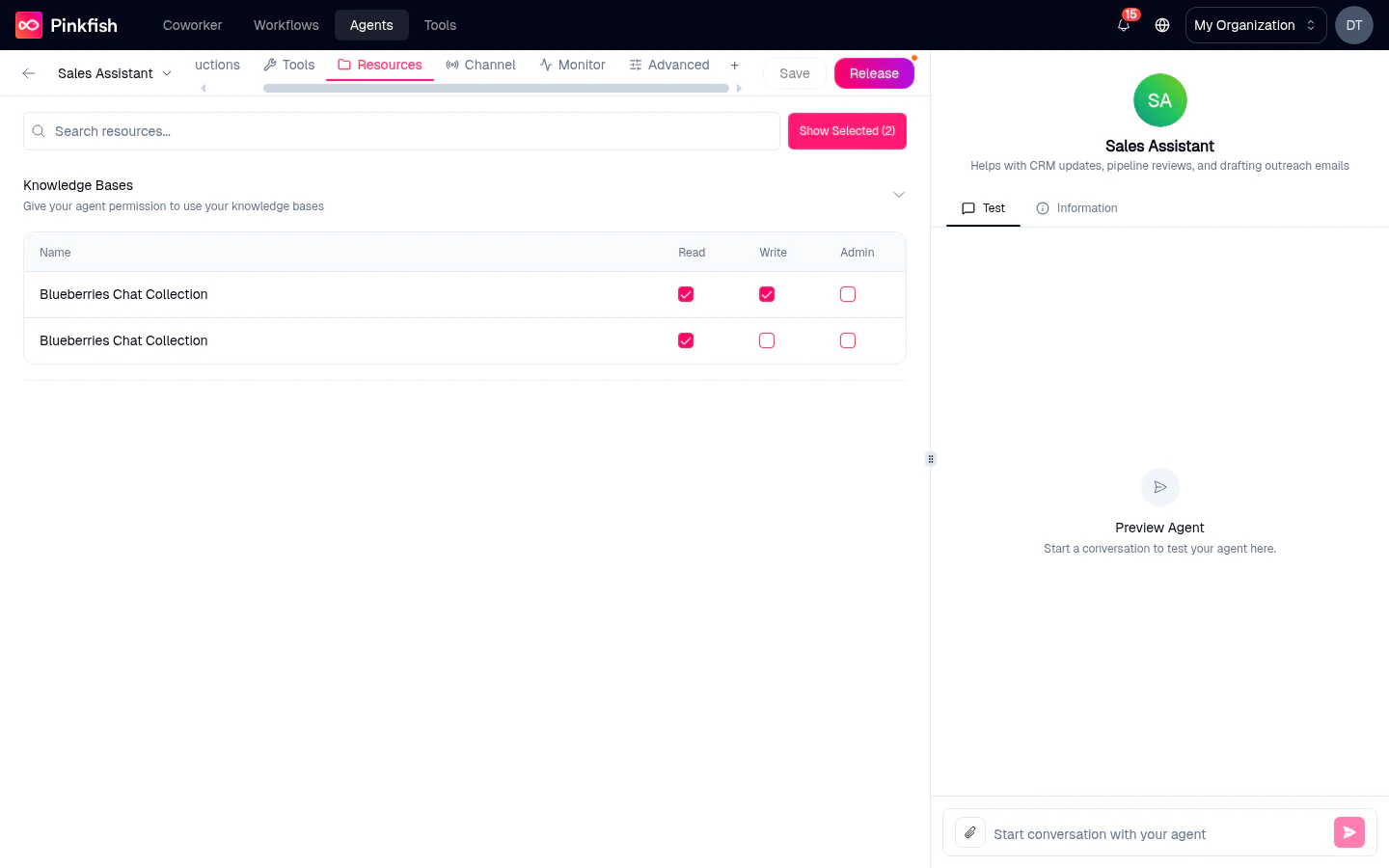 Resources are **data**. Unlike [Tools](/agents/tools), which are actions the agent can take, resources define what the agent can read, write to, or administer.
## The four resource types
### Structured Databases
Pinkfish **datastores** with a schema — tables with typed columns. Think customer records, opportunities, tickets.
> *"Give your agent permission to use your structured databases (tables)"*
Attach a structured datastore and the agent can query it, filter rows, add new rows (if you grant Write), or delete rows (if you grant Admin).
See [Datastore](/resources/database) for how to create one.
### Unstructured Databases
Datastores that store freeform documents or JSON blobs without a fixed schema. Useful for rolling logs, notes, and anything that doesn't fit a table.
### Files
Pinkfish **filestores** — a place to store PDFs, images, spreadsheets, and any binary content. Attach a filestore and the agent can upload new files, read existing ones, or — with Admin — delete them.
See [Filestore](/resources/file-store) for details.
### Knowledge Bases
Semantic search over your documents. Attach a KB collection and the agent can perform natural-language queries against its contents and get back ranked snippets.
See [Knowledge Base](/resources/knowledge-base) for ingestion details.
## Permissions
Every attached resource requires at least one permission to be checked. The three permissions:
| Permission | What the agent can do |
| ---------- | -------------------------------------------------- |
| **Read** | Query / list / search the resource. |
| **Write** | Create new entries or update existing ones. |
| **Admin** | Delete entries and perform administrative actions. |
Grant the minimum permission the agent genuinely needs. A customer-support agent probably needs `Read` on product docs but nothing more; a data-entry agent needs `Write` but not `Admin`.
Resources without any permission checked are invalid — the agent won't save until you pick at least one. There is no "implicit Read" default.
## Search and filter
* **Search resources…** — free-text filter over collection names and descriptions.
* **Show Selected (N)** — collapse the view to just the resources you've attached. `N` reflects the current count.
## Automatic tool injection
When you attach a resource and grant permissions, Pinkfish **automatically adds the matching tools** to your agent under **Tools → Auto-selected Tools**. You don't need to also go to the Tools tab and pick the datastore-query tool — the platform does it for you based on the permissions you picked.
Example: attach a structured datastore with Read permission, and the internal datastore-query tool lights up. Grant Write, and the insert tool is added too. Remove the resource, and the tools are removed.
This means the Resources tab is the only place you configure *what data the agent can reach*. The Tools tab stays focused on *actions*.
## Sharing resources vs sharing agents
Sharing an agent with a colleague gives them **chat access** to the agent — they can talk to it. It does **not** give them access to the attached resources.
* For structured/unstructured datastores and filestores, each user still needs to have their own access to the underlying collection (or the collection must be org-wide).
* For knowledge bases, the same rule applies.
If a user doesn't have permission to a resource the agent depends on, the agent will report a permission error for that tool when it tries to use it.
## Related
* [Tools tab](/agents/tools) — actions (not data).
* [Datastore](/resources/database) — how to create and populate structured/unstructured datastores.
* [Filestore](/resources/file-store) — binary-file storage.
* [Knowledge Base](/resources/knowledge-base) — semantic search over documents.
Resources are **data**. Unlike [Tools](/agents/tools), which are actions the agent can take, resources define what the agent can read, write to, or administer.
## The four resource types
### Structured Databases
Pinkfish **datastores** with a schema — tables with typed columns. Think customer records, opportunities, tickets.
> *"Give your agent permission to use your structured databases (tables)"*
Attach a structured datastore and the agent can query it, filter rows, add new rows (if you grant Write), or delete rows (if you grant Admin).
See [Datastore](/resources/database) for how to create one.
### Unstructured Databases
Datastores that store freeform documents or JSON blobs without a fixed schema. Useful for rolling logs, notes, and anything that doesn't fit a table.
### Files
Pinkfish **filestores** — a place to store PDFs, images, spreadsheets, and any binary content. Attach a filestore and the agent can upload new files, read existing ones, or — with Admin — delete them.
See [Filestore](/resources/file-store) for details.
### Knowledge Bases
Semantic search over your documents. Attach a KB collection and the agent can perform natural-language queries against its contents and get back ranked snippets.
See [Knowledge Base](/resources/knowledge-base) for ingestion details.
## Permissions
Every attached resource requires at least one permission to be checked. The three permissions:
| Permission | What the agent can do |
| ---------- | -------------------------------------------------- |
| **Read** | Query / list / search the resource. |
| **Write** | Create new entries or update existing ones. |
| **Admin** | Delete entries and perform administrative actions. |
Grant the minimum permission the agent genuinely needs. A customer-support agent probably needs `Read` on product docs but nothing more; a data-entry agent needs `Write` but not `Admin`.
Resources without any permission checked are invalid — the agent won't save until you pick at least one. There is no "implicit Read" default.
## Search and filter
* **Search resources…** — free-text filter over collection names and descriptions.
* **Show Selected (N)** — collapse the view to just the resources you've attached. `N` reflects the current count.
## Automatic tool injection
When you attach a resource and grant permissions, Pinkfish **automatically adds the matching tools** to your agent under **Tools → Auto-selected Tools**. You don't need to also go to the Tools tab and pick the datastore-query tool — the platform does it for you based on the permissions you picked.
Example: attach a structured datastore with Read permission, and the internal datastore-query tool lights up. Grant Write, and the insert tool is added too. Remove the resource, and the tools are removed.
This means the Resources tab is the only place you configure *what data the agent can reach*. The Tools tab stays focused on *actions*.
## Sharing resources vs sharing agents
Sharing an agent with a colleague gives them **chat access** to the agent — they can talk to it. It does **not** give them access to the attached resources.
* For structured/unstructured datastores and filestores, each user still needs to have their own access to the underlying collection (or the collection must be org-wide).
* For knowledge bases, the same rule applies.
If a user doesn't have permission to a resource the agent depends on, the agent will report a permission error for that tool when it tries to use it.
## Related
* [Tools tab](/agents/tools) — actions (not data).
* [Datastore](/resources/database) — how to create and populate structured/unstructured datastores.
* [Filestore](/resources/file-store) — binary-file storage.
* [Knowledge Base](/resources/knowledge-base) — semantic search over documents.