> ## Documentation Index
> Fetch the complete documentation index at: https://docs.pinkfish.ai/llms.txt
> Use this file to discover all available pages before exploring further.
# Save & Release
> Draft versions, releases, and how published agents reach Coworker
Agents have two kinds of version: **drafts** (what you're editing) and **releases** (immutable snapshots that users actually chat with). Understanding the split is the key to confident iteration — you can break the draft freely without affecting anyone on the released version.
## Save
Clicking **Save** in the top-right of the builder writes the current form as a new draft. The draft number increments with each save.
**Save** is disabled when:
* there are no unsaved changes, or
* the form has validation errors, or
* the agent is new and required fields (Name, Instructions) are missing, or
* a dashboard / long-running action is already processing.
Save is safe. It never affects existing Coworker users or published channels — only the draft you see in the builder's preview reflects the change.
## Release
Clicking **Release** (the pink button next to **Save**) opens the Publish dropdown.
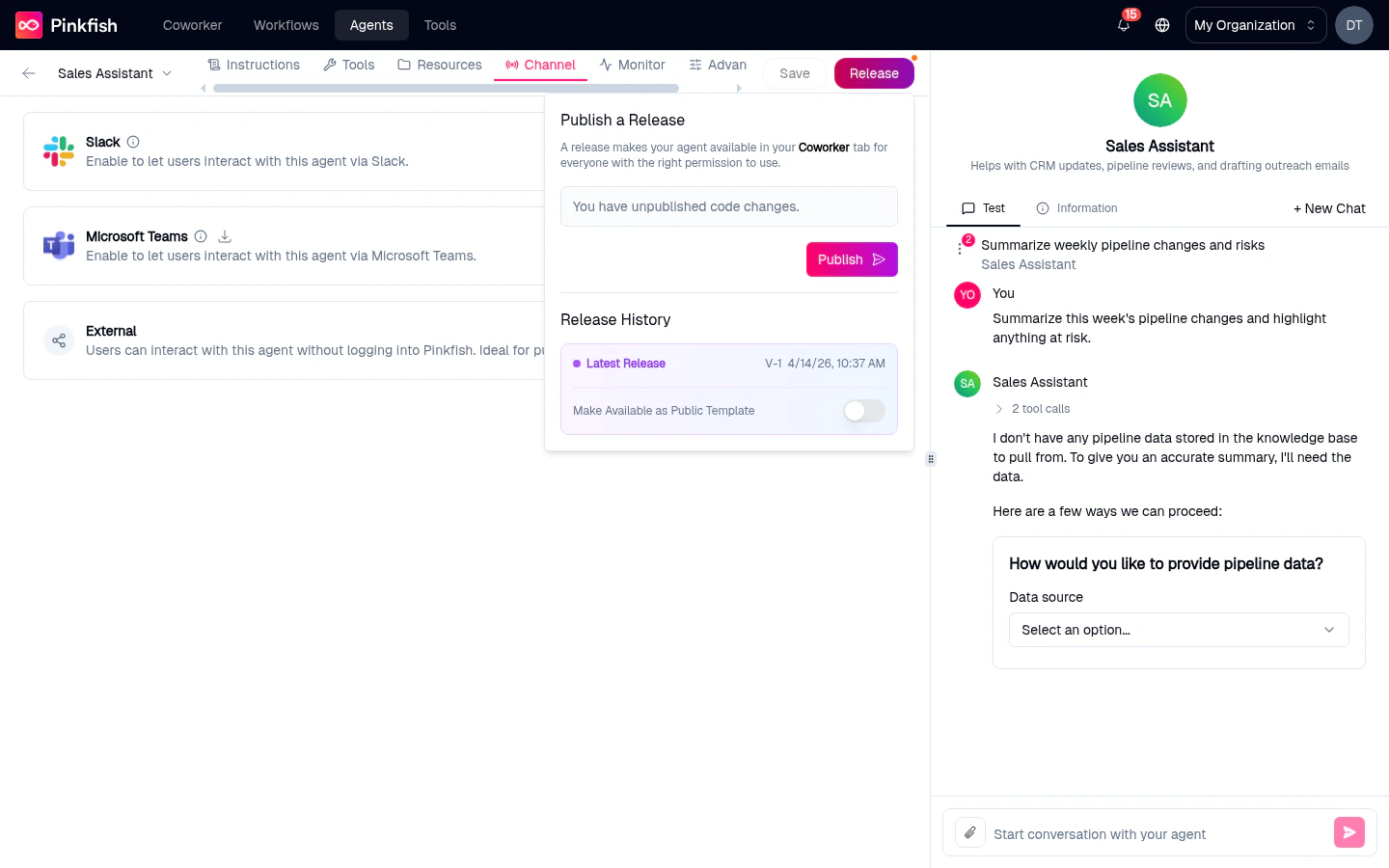 From here you can:
1. **Publish** a new release — snapshots the current draft as an immutable version that becomes available in Coworker (subject to who the agent is shared with).
2. **See release history** — every prior release with its version number and date.
3. **Roll back** — pick an older release to mark it as the latest. (Release artifacts are immutable, so rolling back is really re-pointing at an earlier one.)
### Success and no-change feedback
* Toast on success: **"Release created successfully"**.
* Toast when nothing has changed since the last release: *"No new release was published since the agent didn't change. Make changes to your agent and try publishing again."*
### What a release does
> *"A release makes your agent available in your **Coworker** tab for everyone with the right permission to use."*
When you release an agent:
* **Coworker** users who have permission see the latest release in the agent picker.
* **Slack** / **Teams** / **External** channels start routing messages to the new release.
* **API callers** using the agent's API key get the new release.
Until you release, only you (in the builder preview) are hitting the draft.
## Drafts vs releases at a glance
| Concept | Where you see it | Who can use it |
| --------------------- | ----------------------------------------- | --------------------------------- |
| **Draft** | Preview pane of the builder | Only the person editing |
| **Latest release** | Coworker, Slack, Teams, External URL, API | Everyone the agent is shared with |
| **Previous releases** | Release dropdown > Release History | Nobody, unless you roll back |
## Status badges on the list page
The [My Agents](/agents/my-agents) list summarizes this state as a badge on each row:
| Badge | Meaning |
| ----------------------- | ------------------------------------------------------------------------ |
| **Published** | Has at least one release; draft matches it. |
| **Unpublished Changes** | Has a release, but the current draft differs. The release is still live. |
| **Draft** | Never been released. Only usable from the builder. |
The builder itself shows a small indicator on the Release button when the current draft has unpublished changes relative to the latest release.
## Typical lifecycle
Fill out Instructions, click **Save**. Status on the list: **Draft**.
Chat with the draft in the right-hand preview pane until the behavior looks right.
Click **Release** → **Publish**. Status: **Published**. The agent is now visible in Coworker.
Edit instructions, tools, or resources. Save. Status: **Unpublished Changes** — Coworker users are still on v1.
When happy, click **Release** → **Publish** again. Coworker flips to v2.
If v2 introduces a regression, use **Release History** to roll back to v1 while you fix things in the draft.
## Things that need a release
Some features won't work until you've published at least once:
* **API access** for external callers — the API routes hit the latest release, not the draft.
The [Channels tab](/agents/channels) pops a save-first warning for related toggles.
## API surface
If you prefer programmatic control, the same operations are available:
| Method | Endpoint | Purpose |
| -------- | ------------------------------- | -------------------------------------- |
| `POST` | `/api/useragents/{id}/releases` | Publish the current draft as a release |
| `DELETE` | `/api/useragents/{id}/releases` | Delete a release |
See the [Agent Management API](/api-reference/platform/agent-management) for details.
## Related
* [Agent Builder](/agents/agent-builder) — where Save and Release live.
* [Channels](/agents/channels) — who can reach published releases.
* [My Agents](/agents/my-agents) — status badges summarize this state.
From here you can:
1. **Publish** a new release — snapshots the current draft as an immutable version that becomes available in Coworker (subject to who the agent is shared with).
2. **See release history** — every prior release with its version number and date.
3. **Roll back** — pick an older release to mark it as the latest. (Release artifacts are immutable, so rolling back is really re-pointing at an earlier one.)
### Success and no-change feedback
* Toast on success: **"Release created successfully"**.
* Toast when nothing has changed since the last release: *"No new release was published since the agent didn't change. Make changes to your agent and try publishing again."*
### What a release does
> *"A release makes your agent available in your **Coworker** tab for everyone with the right permission to use."*
When you release an agent:
* **Coworker** users who have permission see the latest release in the agent picker.
* **Slack** / **Teams** / **External** channels start routing messages to the new release.
* **API callers** using the agent's API key get the new release.
Until you release, only you (in the builder preview) are hitting the draft.
## Drafts vs releases at a glance
| Concept | Where you see it | Who can use it |
| --------------------- | ----------------------------------------- | --------------------------------- |
| **Draft** | Preview pane of the builder | Only the person editing |
| **Latest release** | Coworker, Slack, Teams, External URL, API | Everyone the agent is shared with |
| **Previous releases** | Release dropdown > Release History | Nobody, unless you roll back |
## Status badges on the list page
The [My Agents](/agents/my-agents) list summarizes this state as a badge on each row:
| Badge | Meaning |
| ----------------------- | ------------------------------------------------------------------------ |
| **Published** | Has at least one release; draft matches it. |
| **Unpublished Changes** | Has a release, but the current draft differs. The release is still live. |
| **Draft** | Never been released. Only usable from the builder. |
The builder itself shows a small indicator on the Release button when the current draft has unpublished changes relative to the latest release.
## Typical lifecycle
Fill out Instructions, click **Save**. Status on the list: **Draft**.
Chat with the draft in the right-hand preview pane until the behavior looks right.
Click **Release** → **Publish**. Status: **Published**. The agent is now visible in Coworker.
Edit instructions, tools, or resources. Save. Status: **Unpublished Changes** — Coworker users are still on v1.
When happy, click **Release** → **Publish** again. Coworker flips to v2.
If v2 introduces a regression, use **Release History** to roll back to v1 while you fix things in the draft.
## Things that need a release
Some features won't work until you've published at least once:
* **API access** for external callers — the API routes hit the latest release, not the draft.
The [Channels tab](/agents/channels) pops a save-first warning for related toggles.
## API surface
If you prefer programmatic control, the same operations are available:
| Method | Endpoint | Purpose |
| -------- | ------------------------------- | -------------------------------------- |
| `POST` | `/api/useragents/{id}/releases` | Publish the current draft as a release |
| `DELETE` | `/api/useragents/{id}/releases` | Delete a release |
See the [Agent Management API](/api-reference/platform/agent-management) for details.
## Related
* [Agent Builder](/agents/agent-builder) — where Save and Release live.
* [Channels](/agents/channels) — who can reach published releases.
* [My Agents](/agents/my-agents) — status badges summarize this state.