> ## Documentation Index
> Fetch the complete documentation index at: https://docs.pinkfish.ai/llms.txt
> Use this file to discover all available pages before exploring further.
# Instructions tab
> Name, icon, description, system prompt, model, and prompt bubbles
The **Instructions** tab is the first tab in the Agent Builder. It's always pinned and is the minimum viable configuration — every other tab is optional.
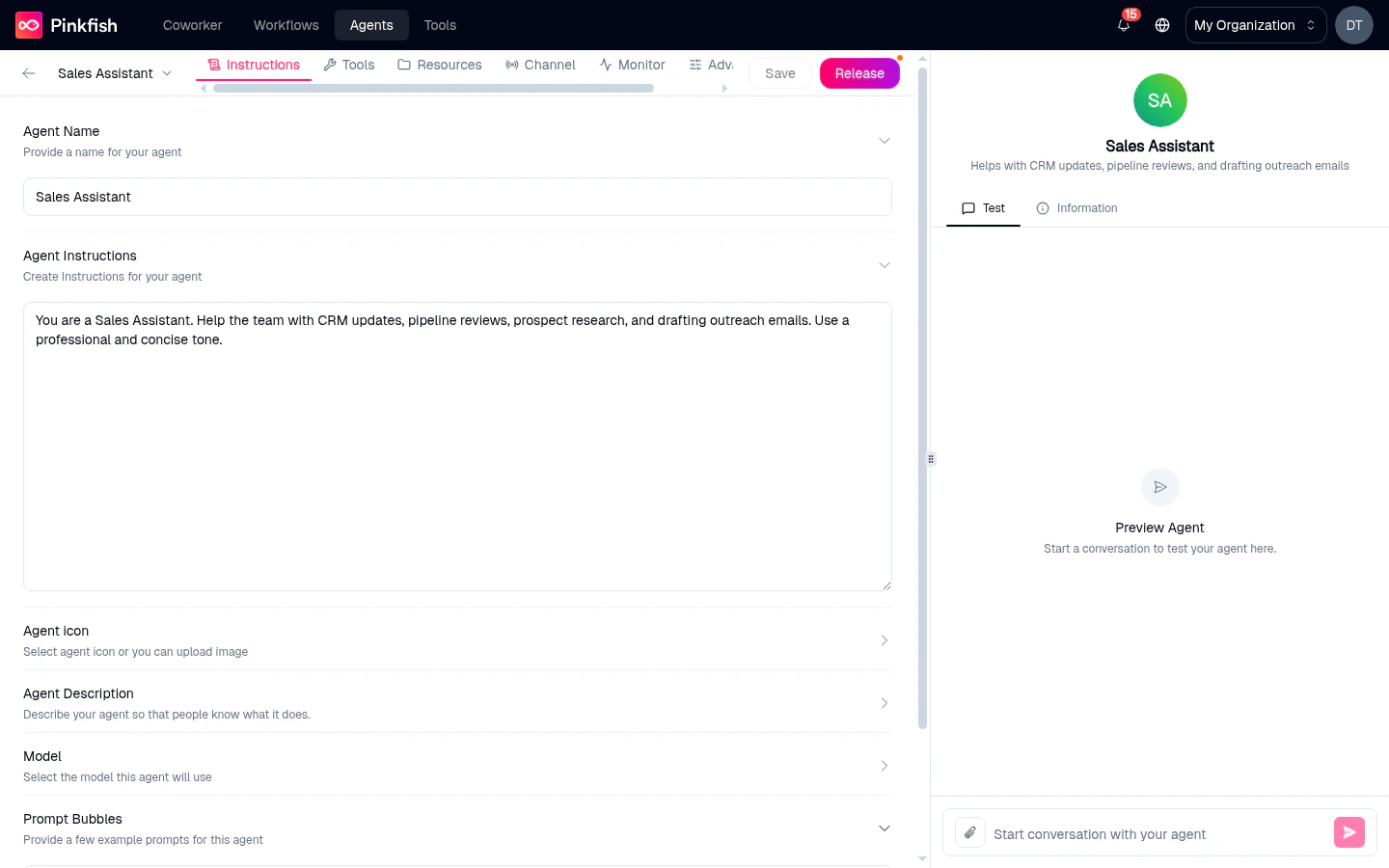 Each field is a collapsible section. Click a section header to expand or collapse it.
## Agent Name
Required. The display name users see in Coworker, in the `@`-mention picker, and in every chat transcript.
* Placeholder: *My Agent*
* Keep it short and human — "Sales Assistant", not "Sales\_Assistant\_v2\_final".
The name is also used by the builder to compute the small two-letter avatar circle in the preview pane (e.g. **SA** for Sales Assistant).
## Agent Instructions
Required. The system prompt that defines how the agent behaves — role, scope, rules, tone, tools it should prefer, and any do-not-do guardrails.
The placeholder offers a starter template along the lines of:
> *Role / What You Do / Rules — You are an AI assistant specialized in \[insert domain or function, e.g. IT service management, HR onboarding, customer support]…*
Tips that tend to produce better agents:
* **Lead with role and scope.** One clear sentence that tells the model who it is and what problem it owns.
* **List rules as bullet points.** Models follow crisp constraints better than paragraph prose.
* **Describe the tools it has.** If you've attached Slack, Gmail, and a knowledge base, name them — the model decides which one to reach for faster.
* **Say what to refuse.** Explicit "when asked about X, politely redirect" rules stop off-scope conversations.
There is no hard character limit, but extremely long prompts consume context on every turn, which can slow responses and raise token usage.
## Agent Icon
Optional. A single-character / emoji / image icon shown next to the agent in lists and preview avatars. Click the section to open the icon picker.
## Agent Description
Optional but recommended. A short, user-facing summary of the agent.
* Placeholder: *Describe what this agent does and its main purpose*
* Shown in the [My Agents list](/agents/my-agents) and in the preview pane header.
Users discover agents in Coworker by reading descriptions, so write for that audience — "Helps with CRM updates, pipeline reviews, and drafting outreach emails" is more useful than "Sales agent".
## Model
Required — but defaulted. The model that runs every turn of this agent's conversations.
Each field is a collapsible section. Click a section header to expand or collapse it.
## Agent Name
Required. The display name users see in Coworker, in the `@`-mention picker, and in every chat transcript.
* Placeholder: *My Agent*
* Keep it short and human — "Sales Assistant", not "Sales\_Assistant\_v2\_final".
The name is also used by the builder to compute the small two-letter avatar circle in the preview pane (e.g. **SA** for Sales Assistant).
## Agent Instructions
Required. The system prompt that defines how the agent behaves — role, scope, rules, tone, tools it should prefer, and any do-not-do guardrails.
The placeholder offers a starter template along the lines of:
> *Role / What You Do / Rules — You are an AI assistant specialized in \[insert domain or function, e.g. IT service management, HR onboarding, customer support]…*
Tips that tend to produce better agents:
* **Lead with role and scope.** One clear sentence that tells the model who it is and what problem it owns.
* **List rules as bullet points.** Models follow crisp constraints better than paragraph prose.
* **Describe the tools it has.** If you've attached Slack, Gmail, and a knowledge base, name them — the model decides which one to reach for faster.
* **Say what to refuse.** Explicit "when asked about X, politely redirect" rules stop off-scope conversations.
There is no hard character limit, but extremely long prompts consume context on every turn, which can slow responses and raise token usage.
## Agent Icon
Optional. A single-character / emoji / image icon shown next to the agent in lists and preview avatars. Click the section to open the icon picker.
## Agent Description
Optional but recommended. A short, user-facing summary of the agent.
* Placeholder: *Describe what this agent does and its main purpose*
* Shown in the [My Agents list](/agents/my-agents) and in the preview pane header.
Users discover agents in Coworker by reading descriptions, so write for that audience — "Helps with CRM updates, pipeline reviews, and drafting outreach emails" is more useful than "Sales agent".
## Model
Required — but defaulted. The model that runs every turn of this agent's conversations.
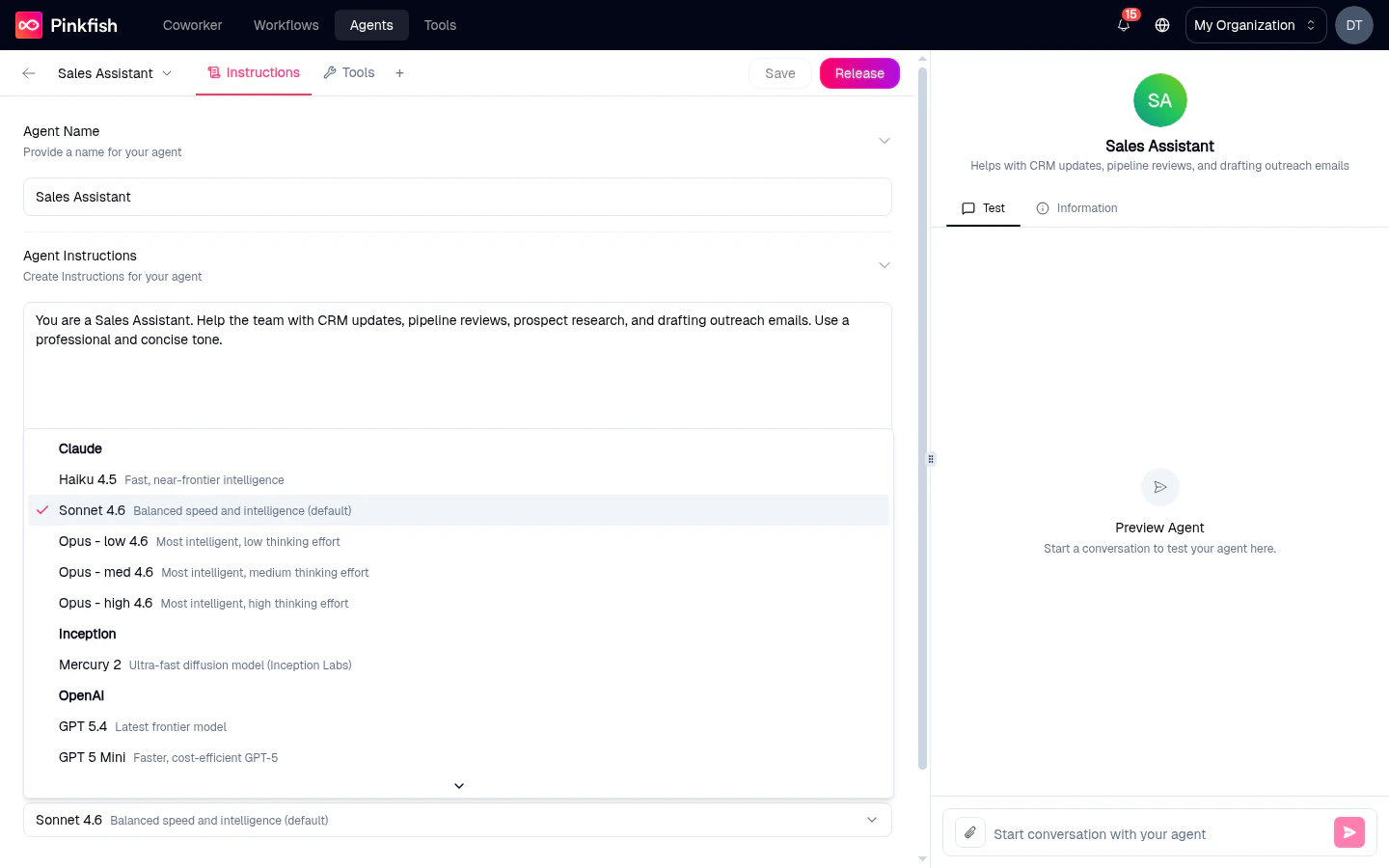 Models are grouped by provider. The exact labels available depend on what your organization has enabled, but typically you'll see:
* **Claude** — Haiku 4.5 (fast, low-friction), Sonnet 4.5 (balanced, the default), Opus Low / Med / High (most intelligent; Low / Med / High controls thinking effort).
* **Inception** — Mercury 2 (ultra-fast diffusion model; good for narrow code tasks).
* **OpenAI** — GPT-5.4, GPT-5 Mini, GPT-5 Nano.
* **Groq** — hosted open-weights models (e.g. GPT-OSS-120B, GPT-OSS-20B).
* **Fireworks** — hosted open-weights models (e.g. Kimi-K2p5).
Each row in the dropdown shows a short description next to the label ("fast, low-cost", "balanced speed and intelligence (default)", etc.).
Changing the model **does not auto-tune the system prompt**. A prompt that works great on Sonnet may behave differently on Haiku or a non-Claude model. Always re-test in the preview after switching.
## Prompt Bubbles
Optional. One-click conversation starters shown in the preview pane and in Coworker when your agent is selected.
* Placeholder: *Example 1 / Example 2 / Example 3*
* One starter per line in the textarea.
* Keep them short — they render as small rounded buttons.
A good set has three to six varied starters that cover common first-asks. For a sales agent, that might be:
```
Summarize this week's pipeline changes
Draft a follow-up email for the Acme meeting
What deals are stalled for more than 14 days?
```
Up to six buttons are shown on channels that display them.
## Required vs optional
| Field | Required | Used for |
| ------------------ | --------------- | ---------------------------------- |
| Agent Name | Yes | Display everywhere |
| Agent Instructions | Yes | System prompt on every turn |
| Model | Yes (defaulted) | Which LLM runs the agent |
| Agent Icon | No | Visual identity |
| Agent Description | No | Discovery copy in lists / Coworker |
| Prompt Bubbles | No | Quick-start buttons |
You can save and release an agent with only Name + Instructions filled, but for anything user-facing, fill Description and Prompt Bubbles too.
## Related
* [Tools tab](/agents/tools) — pick which tools the agent can call.
* [Agent Memory](/agents/introduction#agent-memory) — long-lived memory across sessions.
* [Save & Release](/agents/releases) — what happens when you click **Save**.
Models are grouped by provider. The exact labels available depend on what your organization has enabled, but typically you'll see:
* **Claude** — Haiku 4.5 (fast, low-friction), Sonnet 4.5 (balanced, the default), Opus Low / Med / High (most intelligent; Low / Med / High controls thinking effort).
* **Inception** — Mercury 2 (ultra-fast diffusion model; good for narrow code tasks).
* **OpenAI** — GPT-5.4, GPT-5 Mini, GPT-5 Nano.
* **Groq** — hosted open-weights models (e.g. GPT-OSS-120B, GPT-OSS-20B).
* **Fireworks** — hosted open-weights models (e.g. Kimi-K2p5).
Each row in the dropdown shows a short description next to the label ("fast, low-cost", "balanced speed and intelligence (default)", etc.).
Changing the model **does not auto-tune the system prompt**. A prompt that works great on Sonnet may behave differently on Haiku or a non-Claude model. Always re-test in the preview after switching.
## Prompt Bubbles
Optional. One-click conversation starters shown in the preview pane and in Coworker when your agent is selected.
* Placeholder: *Example 1 / Example 2 / Example 3*
* One starter per line in the textarea.
* Keep them short — they render as small rounded buttons.
A good set has three to six varied starters that cover common first-asks. For a sales agent, that might be:
```
Summarize this week's pipeline changes
Draft a follow-up email for the Acme meeting
What deals are stalled for more than 14 days?
```
Up to six buttons are shown on channels that display them.
## Required vs optional
| Field | Required | Used for |
| ------------------ | --------------- | ---------------------------------- |
| Agent Name | Yes | Display everywhere |
| Agent Instructions | Yes | System prompt on every turn |
| Model | Yes (defaulted) | Which LLM runs the agent |
| Agent Icon | No | Visual identity |
| Agent Description | No | Discovery copy in lists / Coworker |
| Prompt Bubbles | No | Quick-start buttons |
You can save and release an agent with only Name + Instructions filled, but for anything user-facing, fill Description and Prompt Bubbles too.
## Related
* [Tools tab](/agents/tools) — pick which tools the agent can call.
* [Agent Memory](/agents/introduction#agent-memory) — long-lived memory across sessions.
* [Save & Release](/agents/releases) — what happens when you click **Save**.